






Themes
🎨 You can edit the color and font themes of your eTailPet website by going to Themes. Read on to se
 Jul 10, 2026
The Communication Setup page allows you to view and edit the automated email and SMS templates that are sent to customers (and staff) for specific system events, such as abandoned carts, order status changes, subscription events, and appointment notifications. Templates are organized into three tabs based on which part of the system triggers them. This article shows you how to configure and customize your communications. Take a look!
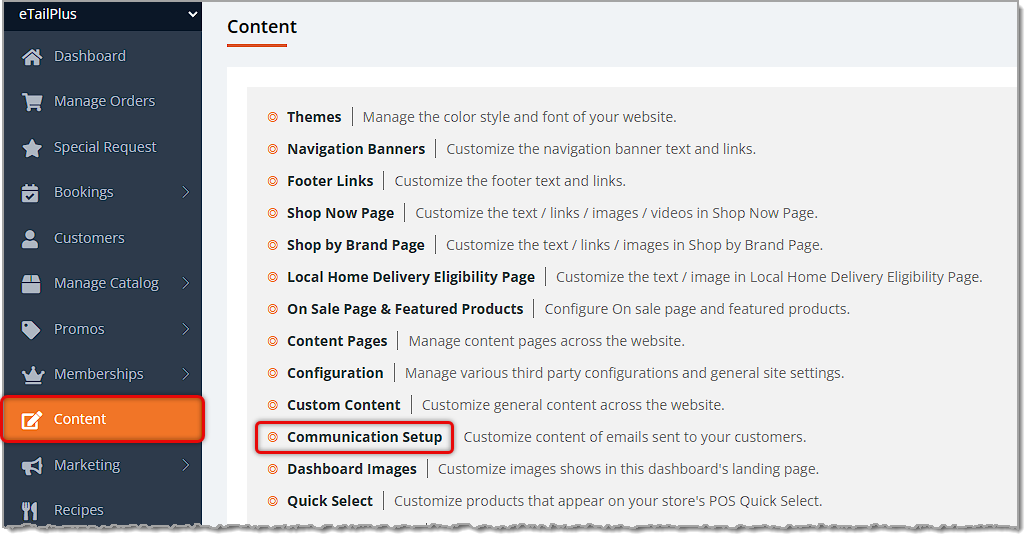
To get to this area, in the main system menu on the left, click on Content, then on the Content page, click on Communication Setup.
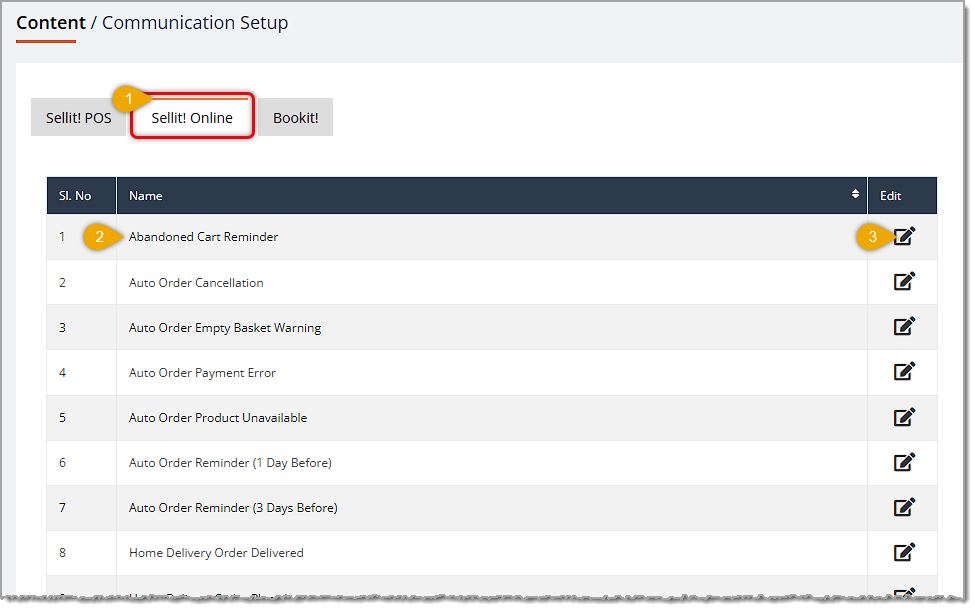
Here is how to work with the message templates on this page:
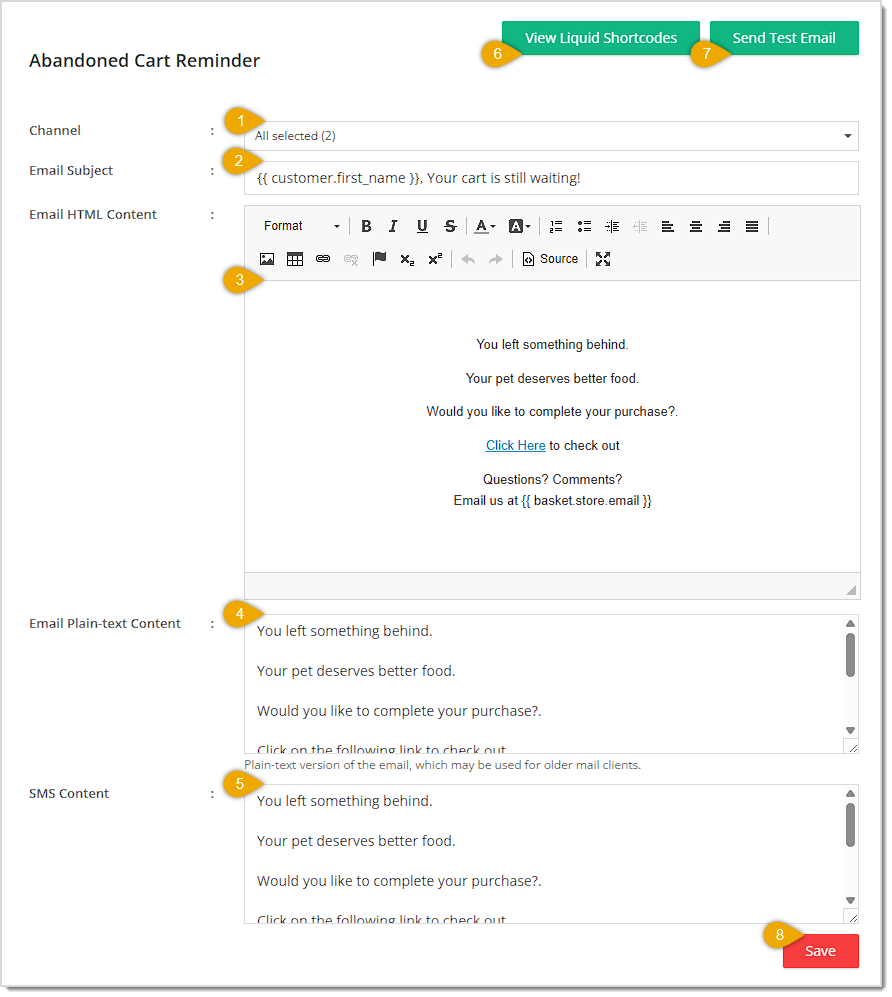
Once you click to Edit a message, the Edit Message window will open and you'll have several options on how to adjust it. All of our message templates have pre-written content in all areas. Our messages are pretty good, but we recommend you make them your own by personalizing them. We will use the Abandoned Cart message from the Sellit! Online tab as an example, but you can adjust all of the areas described below for each of the listed messages. Here is how this page works:

Here are the message templates for each area of the system:
| POS Tab | Webstore Tab | Appointments Tab |
| Etailplus Subscription Automated Payment Failed | Abandoned Cart Reminder | Appointment Cancellation |
| Etailplus Subscription Automated Payment Retry Failed | Auto Order Cancellation | Appointment Completion |
| Etailplus Subscription Cancelled | Auto Order Empty Basket Warning | Appointment Confirmation |
| Etailplus Subscription Created | Auto Order Payment Error | Appointment Rejected |
| Etailplus Subscription Expired | Auto Order Product Unavailable | Appointment Reminder (1 Day Before) |
| Etailplus Subscription Paused | Auto Order Reminder (1 Day Before) | Appointment Rescheduled |
| Etailplus Subscription Plan Changed | Auto Order Reminder (3 Days Before) | Sign Waiver Of Liability |
| Etailplus Subscription Plan Disabled | Home Delivery Order Delivered | |
| Etailplus Subscription Renewal Reminder | Home Delivery Order Placed | |
| Etailplus Subscription Renewed | Home Delivery Order Shipped | |
| Purchase Order Special Request (Private Products) | Notify Home Delivery Agent | |
| Purchase Order Special Request (Public Products) | Order Full Refund | |
| Order Line Refund | ||
| Order Partial Refund | ||
| Pickup Order Picked Up | ||
| Pickup Order Placed | ||
| Pickup Order Separated | ||
| Successful Registration |
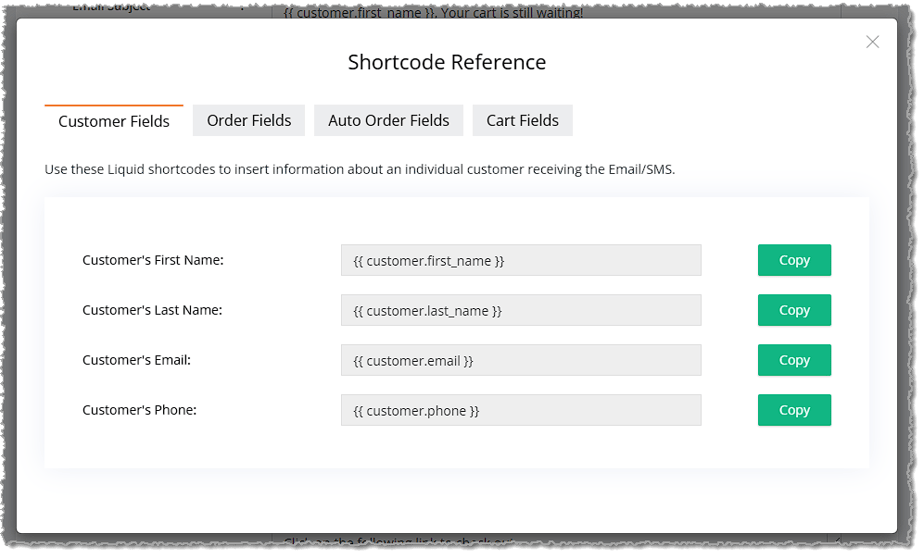
| Customer Fields | Order Fields | Auto-Order Fields | Cart Fields |
| Customer's First Name | Order ID | Auto Order Name | Email associated with the cart's store |
| Customer's Last Name | Customer email associated with the Order | Next Order Date | Cart Summary Link |
| Customer's Email | Store Name associated with the Order | Frequency | |
| Customer's Phone | Store Email associated with the Order | Store Name | |
| Store Address associated with the Order | Product List | ||
| Store Phone associated with the Order |
Q: Can I send a template through both email and SMS at the same time?
A: Yes, select both Email and SMS in the Channel field, and be sure to fill in both the Email content fields and the SMS Content field.
Q: What are the merge variables like used in the templates?
A: These are Liquid Shortcodes that get automatically replaced with real customer or order data when the message is sent. Click View Liquid Shortcodes on any template's edit screen to see the full list available for that template.
Q: Why is there an Email Plain-text Content field if I already filled in the Email HTML Content?
A: Some older email clients can't render HTML emails properly, so the plain-text version is used as a fallback to make sure the message is still readable.
Q: How can I check what a template will actually look like before it goes out to customers?
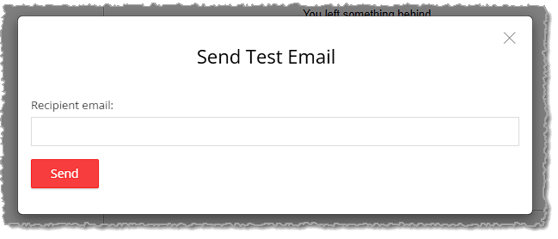
A: Click Send Test Email on the template's edit screen to send yourself a live preview using the current content.
Q: Why are there three separate tabs (Sellit! Online, Sellit! POS, Bookit!)?
A: Each tab groups templates by the part of the system that triggers them — Sellit! Online covers storefront/e-commerce events, Sellit! POS covers point-of-sale subscription and purchase-order events, and Bookit! covers appointment booking events.
Q: I have a question, but I can't find my answer here. How do I get more assistance?
A: You can ask any question at the number listed here. Contact our support team at (323) 370-0738 for the U.S. and (888) 370-2363 for Canada.
Is this page helpful?
×Help us improve our articles