






Customers in New Sale
The eTailPet system has useful and easy functionality for working with your customers in New Sale. T
 Aug 05, 2026
Astro Loyalty has several engaging programs to keep your customers coming back for more. This article will show you what the Astro Loyalty programs can do for your customers and how you can facilitate them. Explore what's there for you!

Astro's Frequent Buyer Engine is a digital platform to manage all of your manufacturer-sponsored Frequent Buyer Programs. Astro works to integrate and streamline the Frequent Buyer process by linking retailers directly to their distributors with real time automated reporting functions that allow retailers to track the progress of their Frequent Buyer credits.
How do Astro FBC Programs Work?
How to Enroll in Astro FBC Programs
In the eTailPet New Sale page, you can view available cards for customers who are connected to Astro by clicking Astro FBC, highlighted in the image below. Be sure to add a customer who is connected to Astro to the transaction first.
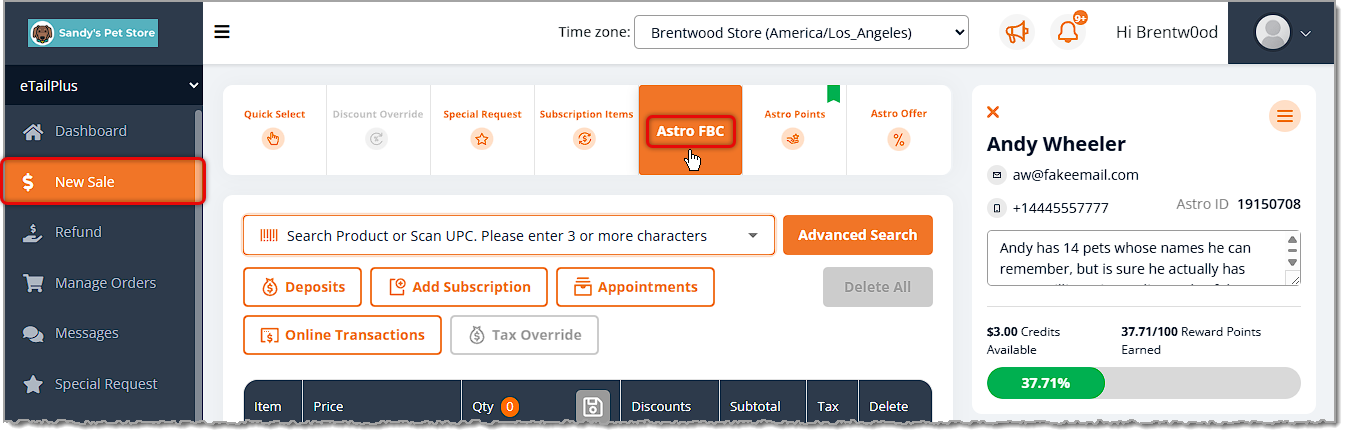
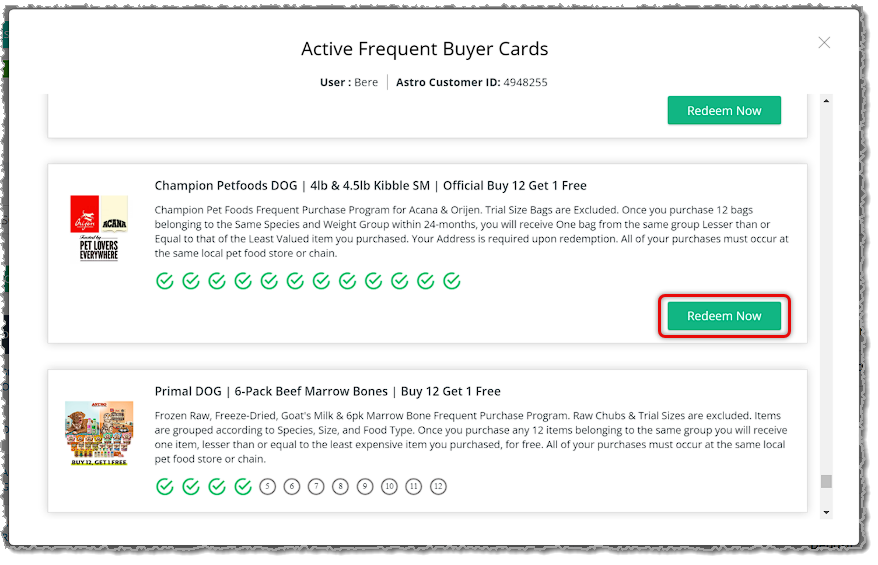
When customers purchase an item that qualifies for an FBC that you are enrolled in, a punch will automatically be applied to their card. When they have enough punches to redeem, you apply the redemption with the click of a Redeem Now button.
Astro Offers are set promotions created for you, the retailer, to give amazing and exclusive deals to your customers without having to deal with the hassle of paper coupons and clearing houses. Astro works with your favorite brand manufacturers daily to create exclusive deals for your customers every month. These Offers are only for Astro users and are not available to big box, e-commerce, or non-Astro retailers. This exclusivity allows you to drive store loyalty and ensures customers continue to frequent your business.
What are Astro Offers?
How to Enroll in Astro Offers
Astro Offers can be either a rebate or a Buy/Get offer. When a customer purchases an item that qualifies for an Astro Offer, the rebate or Buy/Get item can be redeemed seamlessly in the eTailPet New Sale page. The crew member simply clicks the Apply Offer button. With an Astro-enrolled customer loaded, you can click the Astro Offers button, and you can see how the offers work in New Sale:
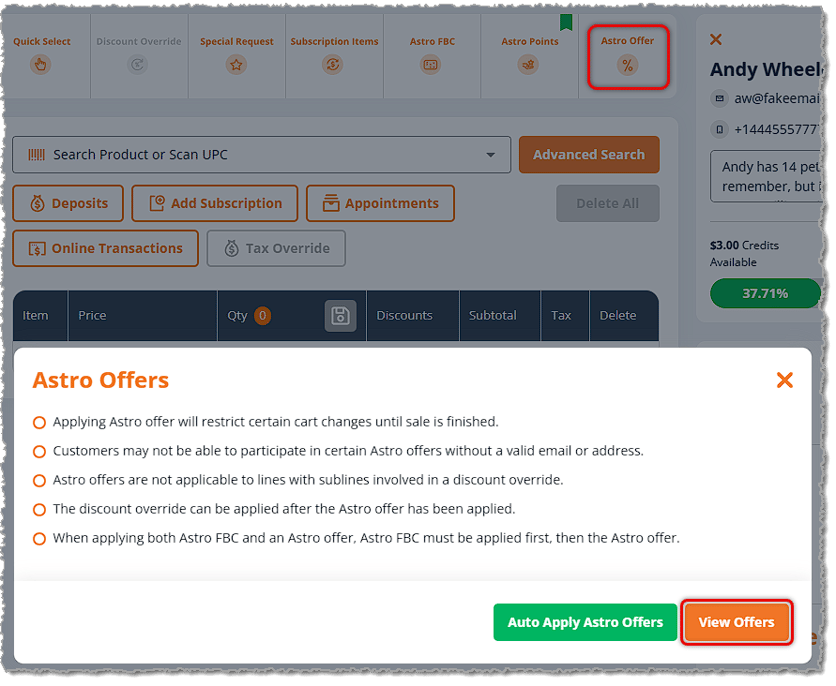
When using Astro Offers, the following guidelines apply:
You have the option of Auto Applying Astro Offers, which would just find any offers that might apply to whatever the customer is purchasing and the system would apply them when possible. You can also click the View Offers button to manually browse through and apply offers.
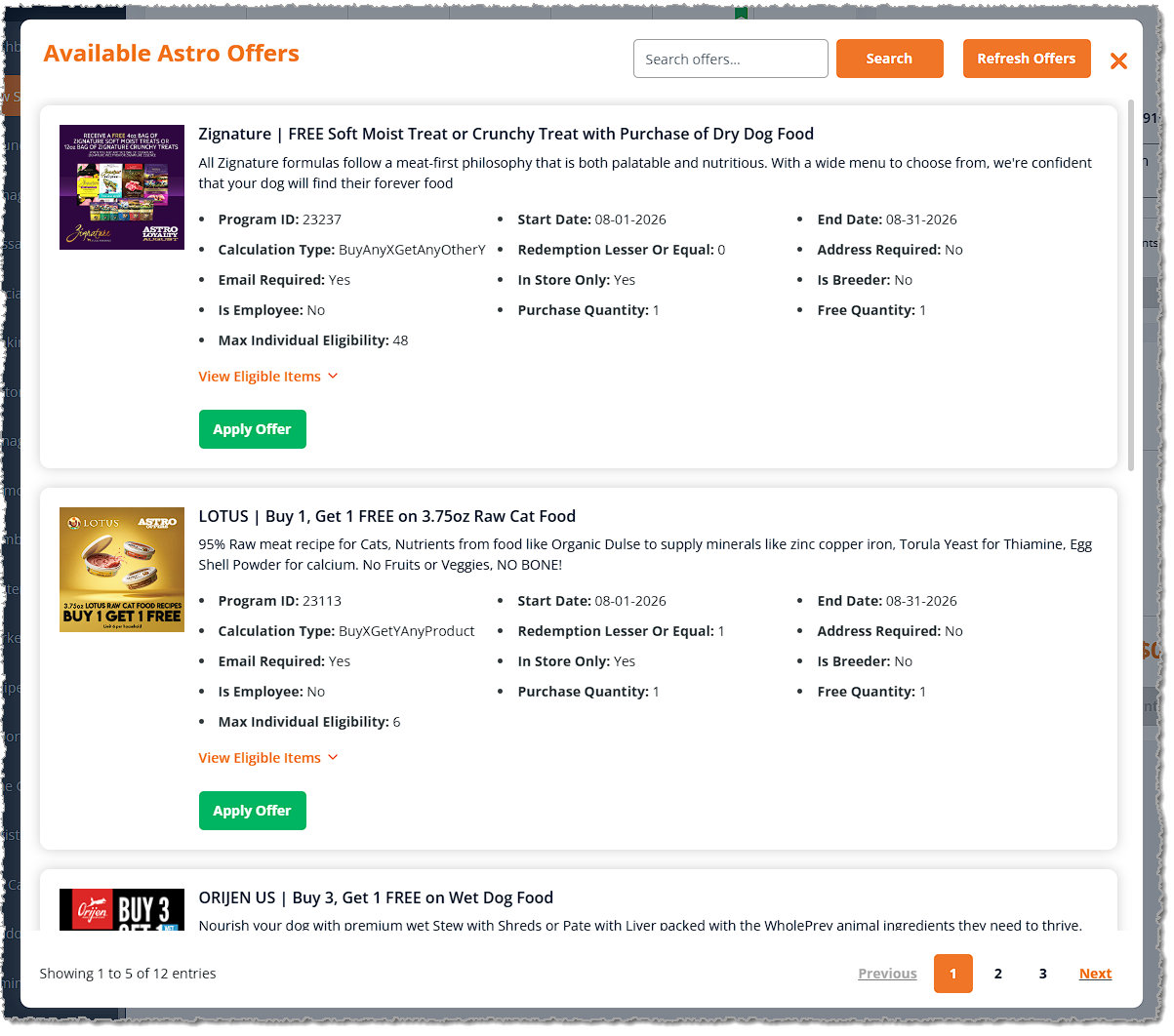
For any offer the customer might be interested in, you can click to View Eligible Items, where you'll see a list of all items that qualify for the offer, and you can click Add to Sale buttons for them if the customer wants to purchase them for the offer. If you have the Auto-Apply Offer active, whenever the Cart meets the item and quantity requirements of an Astro Offer, it will auto apply and show you a success pop-up in the upper right. You'll see the line item discount, as shown below.
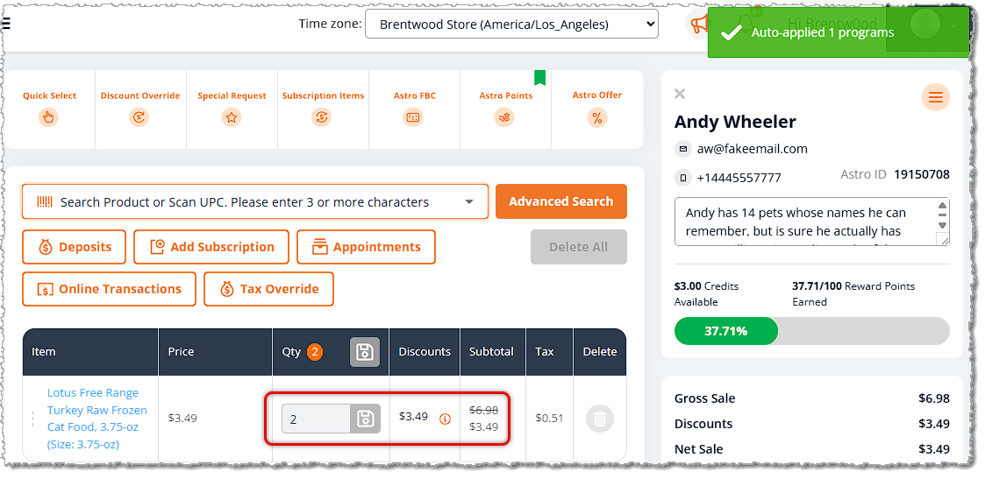
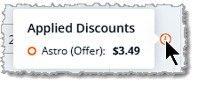
You can click on the Info icon next to the Discount to see details about where it came from, if needed.
A points-based loyalty program is another option for retailers that is separate from other individual programs offered at the store. These programs offer points to customers for participating in your events or buying certain items. Once a customer earns enough points, they are able to redeem the points for rewards, and this is also something you set up. Most commonly these programs are based on the amount of dollars spent where 1 point is equal to $1, but you can have points equal any dollar amount you wish.
How to Set Up an Astro Loyalty Points Program
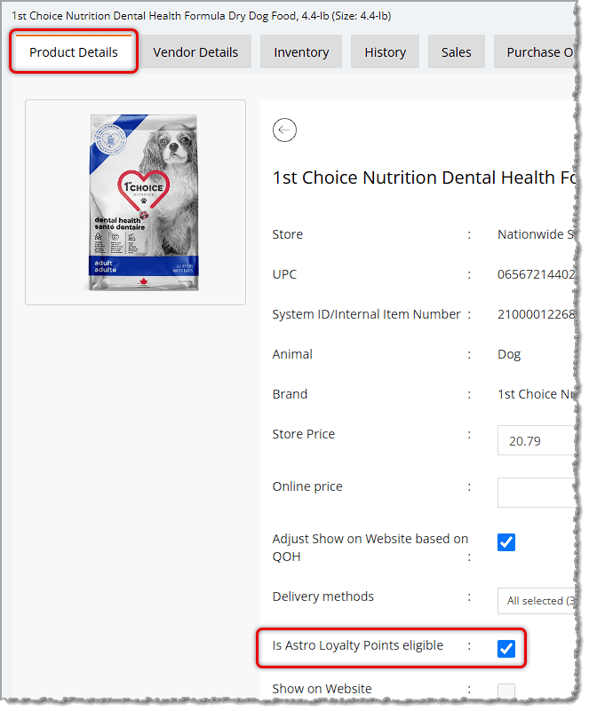
Astro Loyalty Points rewards are integrated right into the eTailPet POS checkout. Points are added automatically when customers connected to Astro purchase qualifying products. You can set which products you want to include in your custom programs. Open the Product's Details page and on the Product Details tab, find the setting for Is Astro Loyalty Points Eligible and check the box, then click the Save button in the upper right. By default, products will be eligible to generate Astro Points.
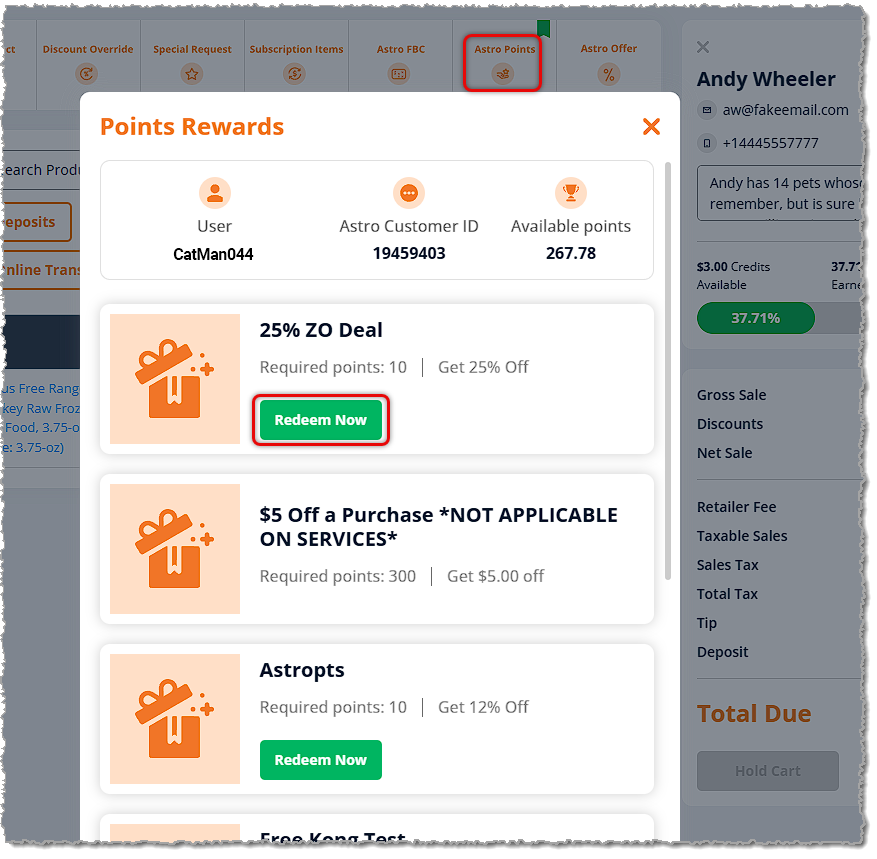
If the customer has built up enough points to qualify for one or more of your Point Rewards, when you load them into the New Sale page, you'll see a green flag on the Astro Points button, as pictured below. You can click to open the Points Rewards window where you can see how many points the customer has; for Rewards they qualify for, you'll see a Redeem Now button. Click the button to exchange the customer's points accordingly for the reward.
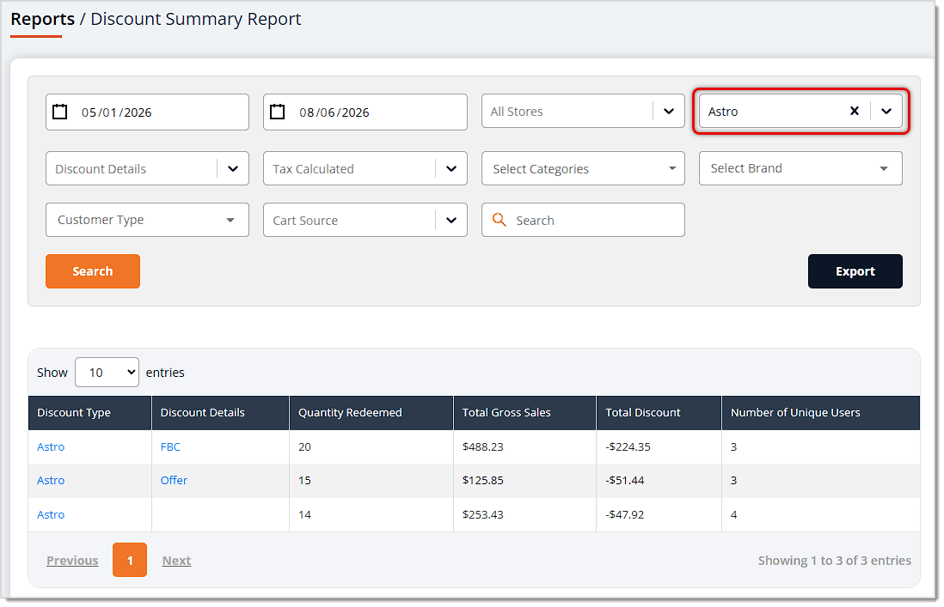
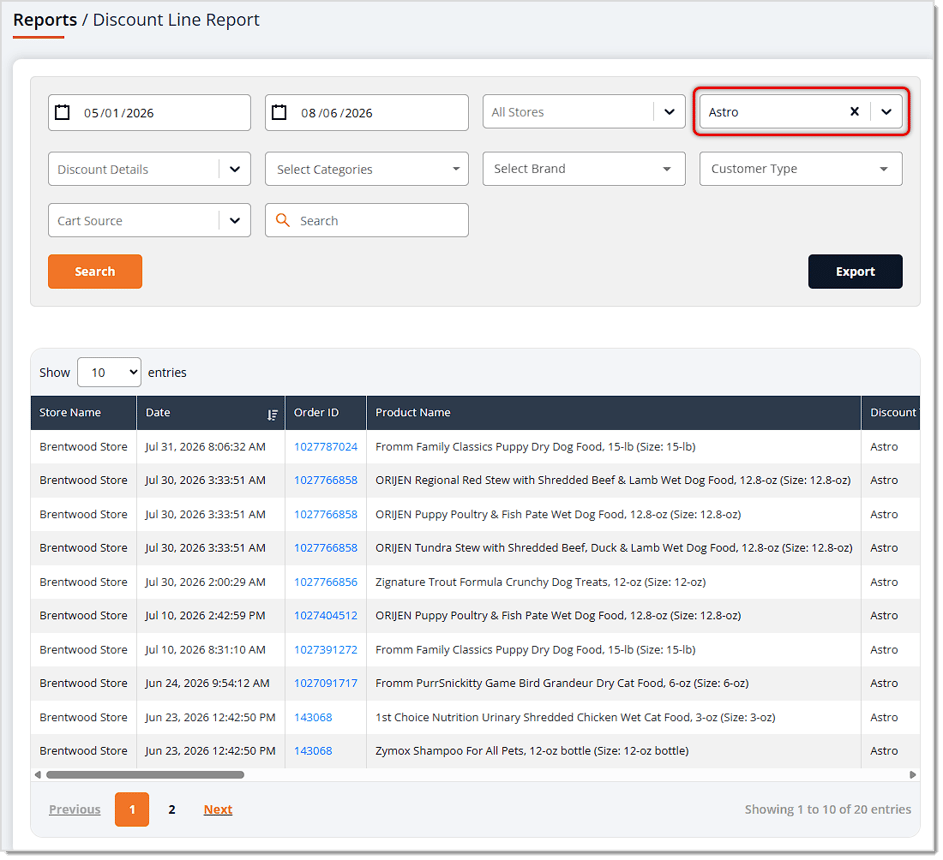
You are able to see all Astro discounts, and any other discounts, in the Discount Summary Report and the Discount Line Report from the Discounts and Promotional section of the Reports page.
The Discount Summary Report, when you filter for Astro discounts as shown below, will list all Astro Discounts in transactions for whatever Date Range you choose. In the example below, we can see that 20 people redeemed FBC rewards, 15 redeemed Astro Offers, and 14 redeemed Astro Points rewards, along with the total dollar amounts for each type of Astro program.
For an item-level view of your Astro discounts, use the Discount Line Report filtered to Astro discounts and whatever Date Range you want. You'll see items that received discounts, as shown below.
Astro Loyalty Customer Connection
In-House Rewards Program Reports
Discount and Promotional Reports
Q: I have a question, but I can't find my answer here. How do I get more assistance?
A: You can ask any question at the number listed here. Contact our support team at (323) 370-0738 for the U.S. and (888) 370-2363 for Canada.
Is this page helpful?
×Help us improve our articles