







Holding and Resuming Transactions
Sometimes you have to put transactions on hold so the customer can come back later to complete it. T
 May 20, 2026
The eTailPet system gives you useful and easy ways to build loyalty points for your customers. This article shows you how to work with the robust Astro Loyalty program integrated with the system as well as how to work with the standard in-house system rewards. Check out how it works!
The eTailPet system has an active integration with Astro Loyalty for advanced and robust loyalty rewards and offers. There is also a System Rewards system stores can use instead of Astro or along with Astro. You'll see which ones are active when you view a customer in New Sale, as pictured here:
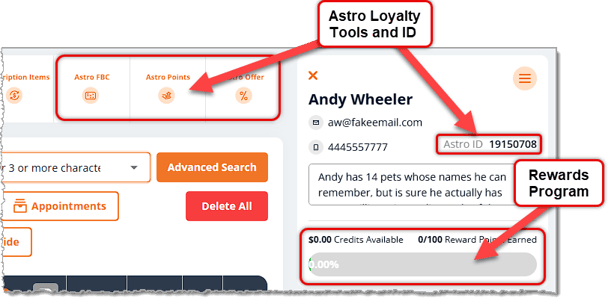
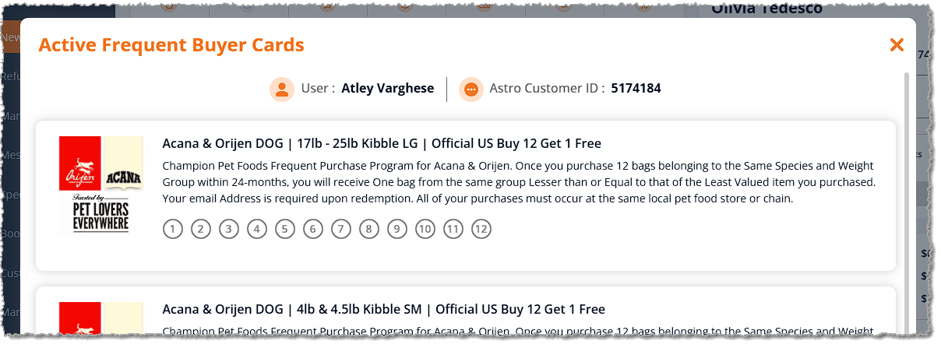
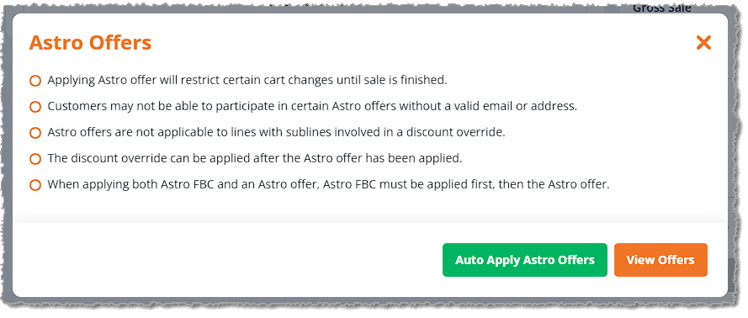
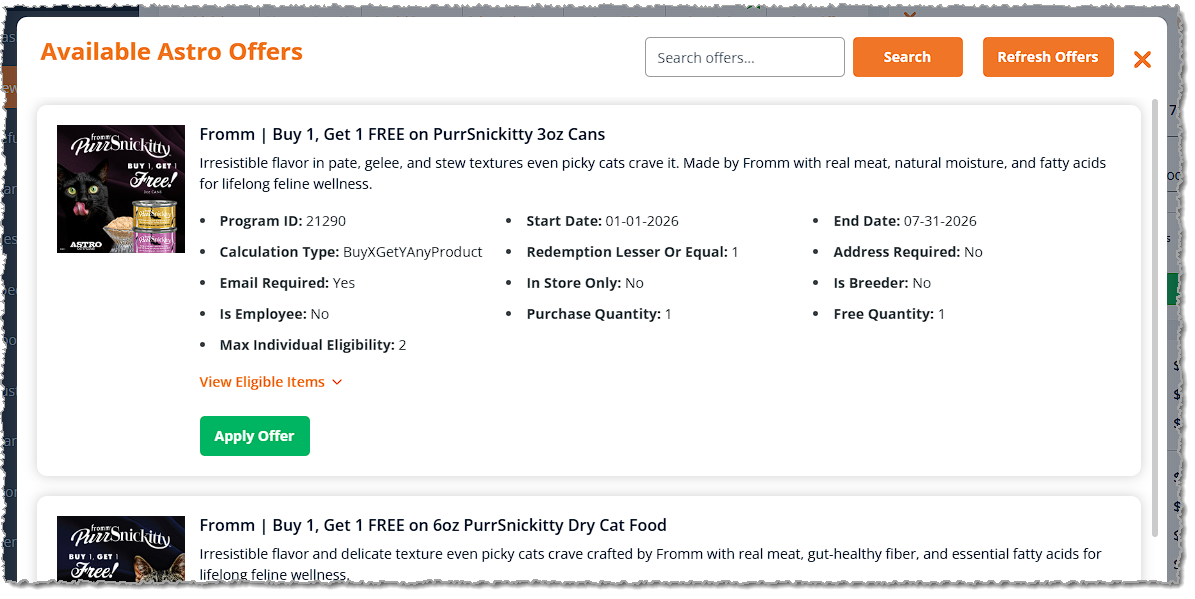
If the customer has Astro Loyalty active, there are three tools in New Sale you can use:

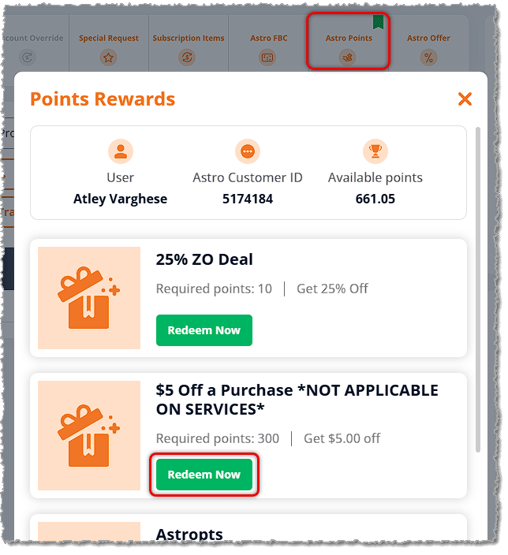
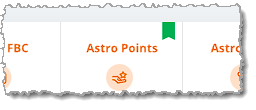
Boss Quote"Make sure your human understands the cart will show you the customer has rewards available with a little ribbon. See the image below. The developers can't be bothered to animate it so it will fly around in enticing and pawable ways, but no humans are purrfect."
— Adrian, Wenatchee, WA
Below are some tips and best practices for Astro rewards and redemptions:
💡Pro Tip: Astro discounts (Astro FBC redemptions, Astro Offers, and Astro Points rewards) can be stacked with Price Slashes and Customer Type discounts, but they cannot be combined with Promo Codes. For example, Astro rewards can be combined with a Senior Discount for a customer set with the Senior customer type.
💡Pro Tip: Astro Frequent Buyer Card redemptions and Astro Offers can be stacked together in one transaction, but only if they are part of separate brand programs.
Example Scenario 1 — Can Be Stacked
Let's say the customer is enrolled in an Astro FBC program for Canidae dog food (buy 12 get 1 free, for example). If they're also enrolled in a Boss Dog dog food offer ($4 discount per item, for example), a customer can redeem both discounts in the same order. They will get a free bag of Canidae dog food, along with $4 off their Boss Dog dog food.
Example Scenario 2 — Cannot Be Stacked
Let's say the customer is enrolled in an Astro FBC program for Canidae dog food (buy 12 get 1 free, for example). If they're also enrolled in a Canidae dog food offer ($3 discount per item, for example), the customer cannot redeem both discounts in the same order. In this case, you would complete the second redemption in a separate transaction.
💡Pro Tip: Discounts that customers redeem through Astro are typically reimbursed by the manufacturer. For this reason, the tax collected for each transaction is calculated pre-discount. So the customer will pay the tax on the item, but the manufacturer will pay for the item itself.
Example Scenario
- The customer’s cart contains Product A (price = $10)
- Tax Rate = 5%
- Astro FBC redemption applied to Product A, bringing the gross total to $0
- Taxable Total = $10 (calculated pre-discount because the discount is reimbursed by manufacturer)
- Tax Collected = $0.50 (5% tax rate multiplied by $10 product)
- Total Collected from the Customer for the Item = $0.50
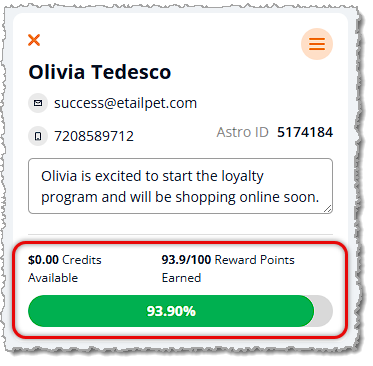
The system Rewards are a basic loyalty program where the customer earns points with purchases until they get to a target number of points, and then they earn a dollar-amount reward that they can use in a future transaction. For example, Olivia, the customer below, needs just over six points to get to the 100-point goal and earn her reward. This all works automatically as the customer spends money, so you don't have to manage anything.
When the customer completes a transaction that puts them over that goal, on their receipt, you'll see that they have restarted a new Reward point amount toward their goal, as in the example below for Olivia.
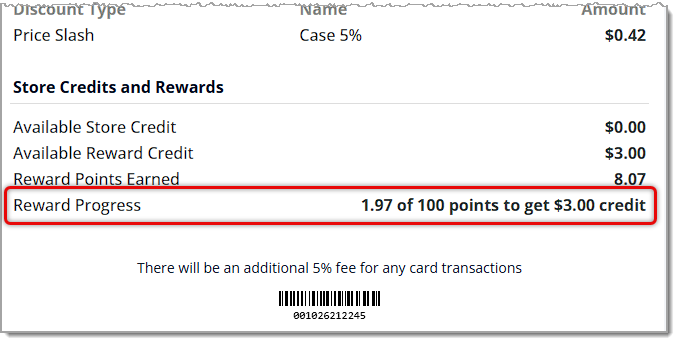
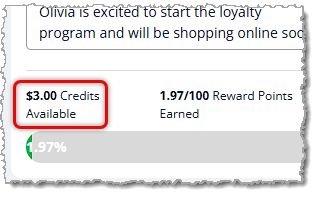
The next time you add the customer to a future transaction, you'll see they have Reward Credits available, as in Olivia's example.
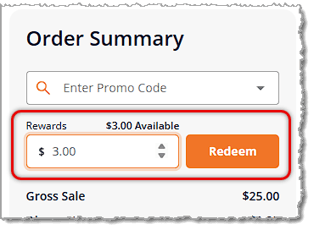
When you go to checkout for the customer, if they have Reward Credits, you can apply them to the sale in the upper left of the Payment window. Just enter the amount of available credits they want to use on this sale into the Rewards field, then click the Redeem button to apply the discount to the cart total.
Q: What's the difference between Astro Loyalty and System Rewards?
A: Astro Loyalty is an integrated program with advanced rewards and offers: Astro FBC, Astro Points, and Astro Offers. System Rewards is a basic points program where the customer earns a dollar-amount reward after reaching a target number of points. Stores can use either one or both. You'll see which ones are active when you view a customer in New Sale.
Q: How do I know a customer has an Astro reward ready to redeem?
A: Look for the small ribbon icon over the Astro Points button in New Sale.
Q: Can Astro rewards be combined with other discounts?
A: Astro discounts (Astro FBC redemptions, Astro Offers, and Astro Points rewards) can be stacked with Price Slashes and Customer Type discounts, but they cannot be combined with Promo Codes.
Q: Can a customer use an Astro FBC and an Astro Offer in the same transaction?
A: Yes, but only if they are part of separate brand programs. Apply the Astro FBC first, then the Astro Offer. If both are for the same brand, complete the second redemption in a separate transaction.
Q: Why does the customer still pay tax on an item covered by an Astro discount?
A: The manufacturer typically reimburses discounts redeemed through Astro, so the tax is calculated pre-discount. The customer pays the tax on the item, and the manufacturer pays for the item itself.
Q: How do I apply System Rewards credits to a sale?
A: In the upper left of the Payment window, enter the amount of Reward Credits the customer wants to use in the Rewards field, then click the Redeem button to apply the discount to the cart total.
Q: I have a question, but I can't find my answer here. How do I get more assistance?
A: You can ask any question at the number listed here. Contact our 24/7 support team at (323) 370-0738 for the U.S. and (888) 370-2363 for Canada.
Is this page helpful?
×Help us improve our articles