






Customers in New Sale
The eTailPet system has useful and easy functionality for working with your customers in New Sale. T
 Aug 04, 2026
The eTailPet POS software is integrated with Astro Loyalty so you can connect with your customers without using external services. You can take advantage of the Astro programs without any hassle or paperwork. This article will show you what the Astro Loyalty integration can do for your customers. Take a look!

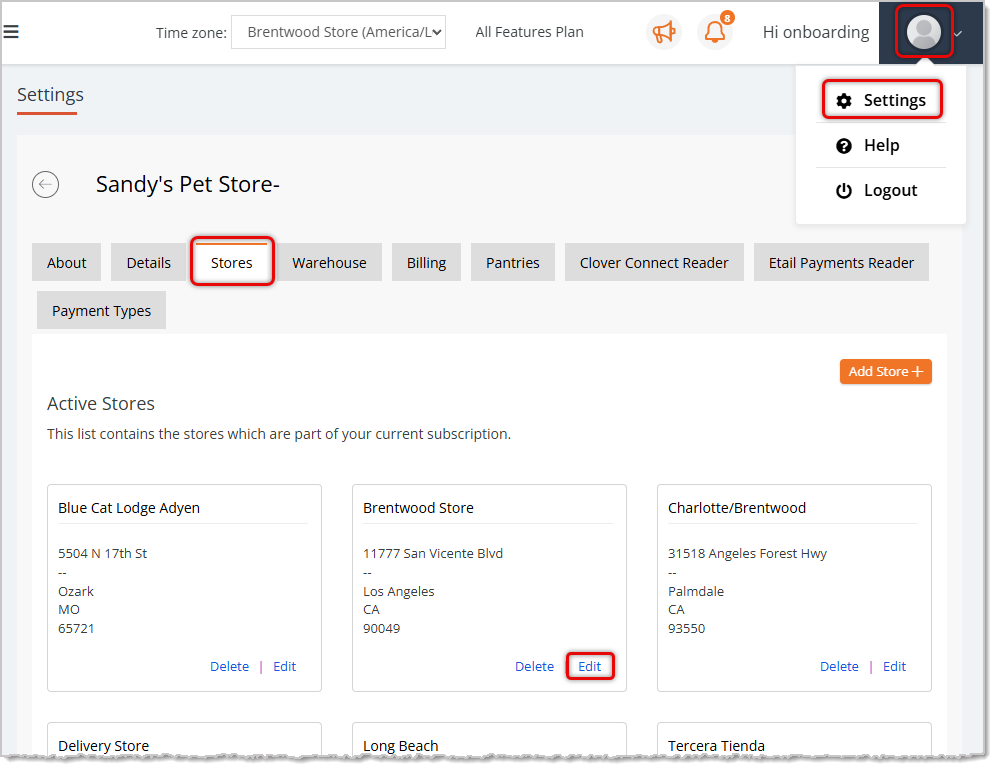
Astro Loyalty has two ways you can connect with your customers. If you have only one store, or you want each store to have a separate Astro Loyalty program, then you can add your login credentials in by clicking on your Account button in the upper right and going to Settings > Stores tab > Edit Store.
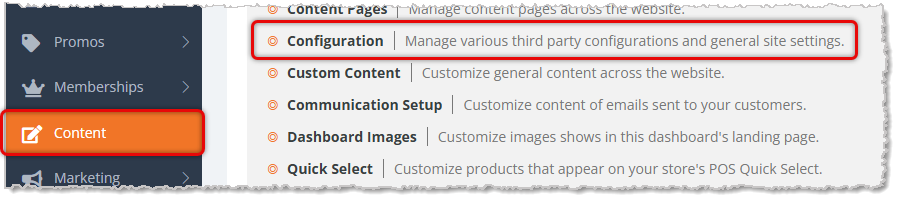
If you have multiple stores and want them all to use the same Astro account, then add your login credentials in Content > Configuration. It is best not to have your credentials in both places. If you do set them up in both, then the single store configuration will override the multi store setup. Click here for more detailed information on integrating your Astro credentials in POS.
Once you have configured your Astro credentials in the eTailPet system, you are ready to start connecting your customers. If you are migrating from another POS, or you already Astro Customers, we can help you import them during onboarding. Once you go live, you will be able to continue adding customers and updating their information through the New Sale screen. You will also be able to manage your customer information, including connecting with Astro in the Customers dashboard. Click here for more detailed information on how to connect customers to Astro in New Sale and the Customers dashboard.
Astro has several different types of programs in which you can enroll your customers. The ones that are integrated with eTailPet are FBC (Frequent Buyer Cards), Manufacturer Rebate Offers, Manufacturer Buy/Get Offers, and Astro Loyalty Points. Click here to learn more about each of these programs, how to enroll in them, and how they are integrated with the eTailPet system.
When you connect your customers to Astro, they will begin earning and redeeming rewards automatically. The eTailPet system automatically keeps track of the FBCs and programs in which you are enrolled. You can see your FBC cards right in the checkout screen. You can also redeem them right in the cart. Click here to learn more about howeTailPet keeps your programs connected, and how you can redeem them for your customers through your POS.
Every now and then you might have a question about how something works. You might also have trouble applying a promotion, or need to check why something isn’t appearing the way you expect. Click here to review our troubleshooting FAQs on how to resolve the most commonly reported issues that retailers have.
The eTailPet system has two reports that detail Astro Loyalty discounts and revenues: Discount Summary Report (transactions) and the Discount Line Report (items). They are on the Reports page in the Discounts & Promotional area. These reports give you an overview of your Astro Redemption for buying, marketing, and sales analyses. Click here to learn more details about your discount and promotional reports.
Below are some tips and best practices for Astro rewards and redemptions.
✴️ Tip: Astro discounts (FBC redemptions, offers, and loyalty rewards) can be stacked with price slashes and “customer type” discounts (i.e. senior discount), but they cannot be combined with promo codes.
✴️ Tip: Astro frequent buyer card free redemptions and Astro offers can be stacked together in one transaction, but only if they are part of separate programs.
Example Scenario 1 – Can Be Stacked: Let's say you're enrolled in a FBC program for Canidae dog food (buy 12 get 1 free, for example). If you're also enrolled in a Boss Dog dog food offer ($4 discount per item, for example), a customer can redeem both discounts in the same order. They will get a free bag of Canidae dog food, along with $4 off their Boss Dog dog food.
Example Scenario 2 – Cannot Be Stacked: Let's say you're enrolled in a FBC program for Canidae dog food (buy 12 get 1 free, for example). If you're also enrolled in a Canidae dog food offer ($3 discount per item, for example), a customer cannot redeem both discounts in the same order. In this case, please complete the free redemption in a separate transaction.
✴️ Tip: Discounts that customers redeem through Astro are typically reimbursed by the manufacturer. For this reason, the tax collected for each transaction is calculated pre-discount.
Example Scenario
Customer’s cart contains Product A (price = $10)
Tax Rate = 5%
Astro FBC redemption applied to Product A, bringing the gross total to $0
Taxable Total = $10 (calculated pre-discount because the discount is reimbursed by manufacturer)
Tax Collected = $0.50 (5% tax rate multiplied by $10 product)
Total Collected = $0.50
⚠️Please Note: The information from Astro is passed electronically via the integration to the eTailPet system. Any-Astro specific questions should be directed to support@astroloyalty.com.
In-House Rewards Program Reports
Q: I have a question, but I can't find my answer here. How do I get more assistance?
A: You can ask any question at the number listed here. Contact our support team at (323) 370-0738 for the U.S. and (888) 370-2363 for Canada.
Is this page helpful?
×Help us improve our articles