






Holding and Resuming Transactions
Sometimes you have to put transactions on hold so the customer can come back later to complete it. T
 May 18, 2026
Hot keys are a way for power users to navigate quickly within the eTailPet system. This article gives you a comprehensive list of keyboard shortcuts (hot keys) and the page or task for each. Take a look!
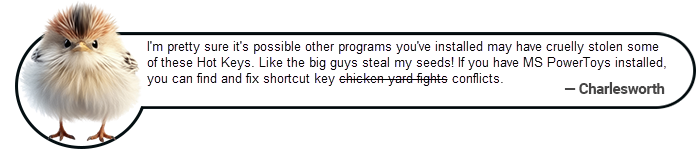
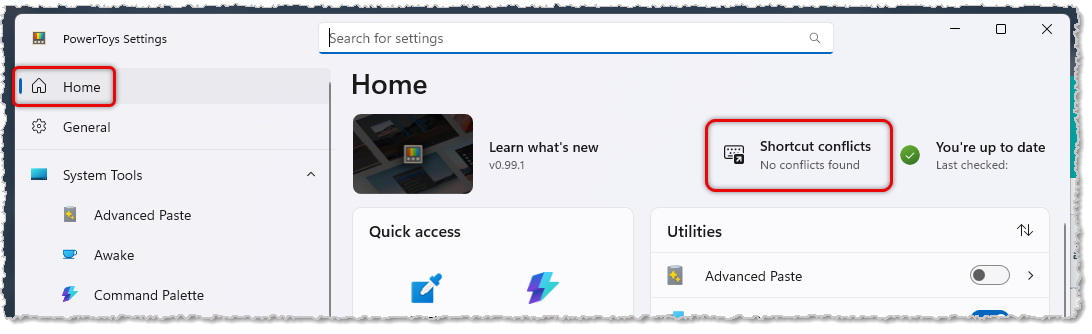
Please Note: Microsoft PowerToys runs in the background and does not slow down your system. If you want to download and install it for Windows 11, click here. When you run PowerToys, from the Settings page Home area, you will see if there are any Shortcut Conflicts (Microsoft Shortcuts = eTailPet Hot Keys). If there are conflicts, that area will take you to the Keyboard Manager where you can remap keys so your third-party program shortcuts will play nicely with eTailPet Hot Keys.
The eTailPet system has several Hot Keys that take you directly to pages within the system. The Landing Page Hot Keys all use the Alt Key plus a Number Key. You hold down Alt, then hit the Number Key you want, either in the row of numbers at the top of your keyboard, or in the 10-key number pad on your keyboard (if it has one). Here are the Landing Page Hot Keys:
| Hot Key | Landing Page |
| Alt+1 | New Sale (Must be logged into the register) |
| Alt+2 | Manage Orders > In-Store Orders |
| Alt+3 | Manage Catalog > My Products |
| Alt+4 | Manage Catalog > My Products > Private Products |
| Alt+5 | Customers |
| Alt+6 | Manage Catalog > Label Changes |
| Alt+7 | Manage Catalog > Purchase Orders |
| Alt+8 | Manage Catalog > Item Write-Off |
| Alt+9 | Vendor Returns |
The eTailPet system also has New Sale Action Hot Keys. These Hot Keys each use Alt plus a Letter Key to perform an action on the New Sale page. Several of the functions below require you to be in the correct area or have a customer loaded, etc., and those are marked with an asterisk (*). Items without that asterisk will work from the New Sale page. Here are your New Sale Action Hot Keys:
| Hot Key | Action in New Sale Page | Description |
| Alt+C | Customer | Moves the cursor to the Customer search field. |
| Alt+D | Payments | Opens the Payment window.* |
| Alt+E | Edit Customer | Opens the Edit Customer window.* |
| Alt+F | FBC Loyalty Rewards | Opens the FBC Loyalty Rewards menu.* |
| Alt+G | Gift Card Payment | Clicks the Gift Card button in the Payment window.* |
| Alt+I | Scan Item | Moves the cursor to the Scan Item field. |
| Alt+M | Max Credit | Clicks the Max button if Credit is selected for Payment.* |
| Alt+N | New Customer | Opens the Add New Customer window. |
| Alt+O | Special Requests | Clicks the Special Request button.* |
| Alt+P | Points Loyalty Rewards | Opens the Points Rewards window.* |
| Alt+Q | Quick Select | Opens the Quick Select window. |
| Alt+R | Override | Opens the Discount Override window. |
| Alt+S | Finish Sale | Clicks the Finish Sale button in the Payment window.* |
| Alt+V | Credit Button | Clicks the Credit button in the Payment window.* |
Boss Quote
* "Obviously you need to teach your human that some of the New Sale Action Hot Keys won't work unless the page is already snuggled up in the right area or condition. Even a kitten would know you can't edit a customer unless you've loaded a customer. Time for my behind-the-ears scratch massage, human."
— Carlton, Shreveport, LA
Q: How do I use a hot key?
A: Hold down the Alt key, then hit the number or letter key for the hot key you want.
Q: Can I use the number pad for the Landing Page Hot Keys?
A: Yes. You can use the row of numbers at the top of your keyboard, or the 10-key number pad if your keyboard has one.
Q: Why doesn't my New Sale hot key work?
A: Hot keys marked with an asterisk only work when you are in the correct area or have the right setup. For example, you need a customer loaded to use Alt+E to edit a customer.
Q: Why does Alt+1 not open the New Sale page?
A: You must be logged into the register to use Alt+1.
Q: A hot key conflicts with another program's shortcut. What can I do?
A: Open the PowerToys Settings page and check the Home area for Shortcut Conflicts. If there are conflicts, that area takes you to the Keyboard Manager, where you can remap keys.
Q: Does PowerToys slow down my computer?
A: No. PowerToys runs in the background and does not slow down your system.
Q: I have a question, but I can't find my answer here. How do I get more assistance?
A: You can ask any question at the number listed here. Contact our 24/7 support team at (323) 370-0738 for the U.S. and (888) 370-2363 for Canada.
Is this page helpful?
×Help us improve our articles