






Export Products
In the eTailPet system, you can easily export your product data as a CSV or XLSX file. If you want t
 Jun 26, 2026
Stock Days in the eTailPet system are scheduled days for ordering from a vendor. A Stock Day listing can be any day of the week, and the frequency is something you can set from 1 to 12 weeks. The advantage of setting up a Stock Day listing is that the system will automatically generate a Created-status Purchase Order for you on the order day that you specify. This article explains how to set up and manage your Stock Days. See how much work they can save you!

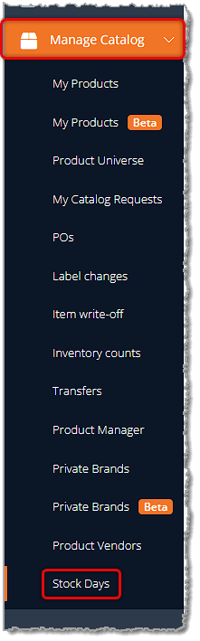
For vendors with whom you make regular, recurring orders, Stock Days are going to save you a lot of time. To create a new Stock Day for a Vendor, in the main Dashboard menu on the left, click on Manage Catalog, then near the bottom of the menu, click on Stock Days.
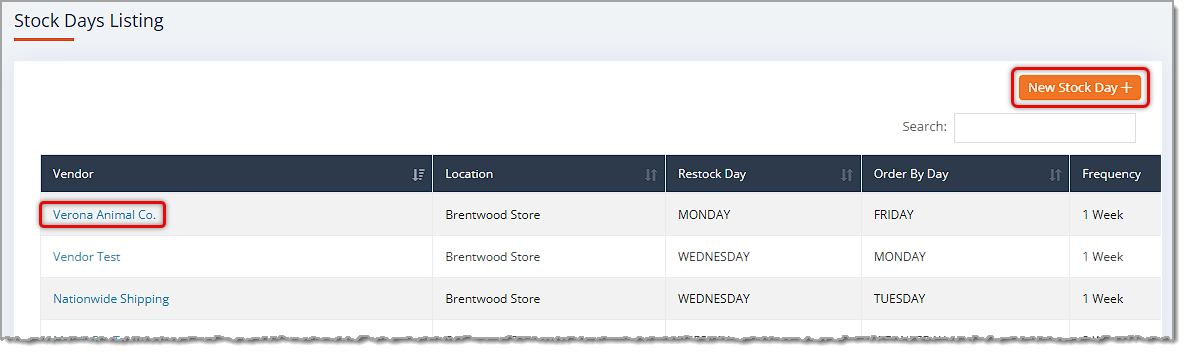
Click the New Stock Day + button in the upper right to create a new listing. Please note that from this page, if you need to Edit a Stock Day you've saved, you can click on the Vendor name and the details will open like the ones pictured below. You can use the Search in the upper right to find the one you want. When editing, you'll have the option to Delete the Stock Day or to Save changes.
Here is how to configure a Stock Day:
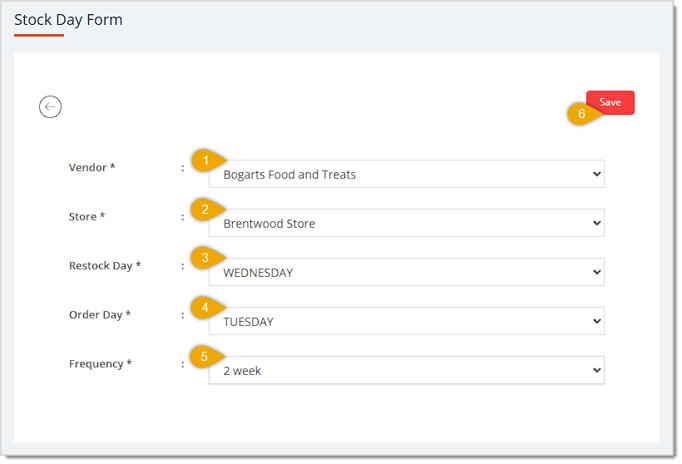
💡Please Note: It’s possible to set up stock days for alternating weeks by creating a stock day and setting it for every 2 weeks. Then wait until the next week and set up the second stock day for 2 weeks. This way, each week will be a different vendor PO.
*All fields are required.
Once you have set up the stock day, the new PO will automatically appear in your Purchase Orders page on the order day. The status will be set as Created so that once you open it, you just set your normal PO parameters and run it. Any Created PO that is not used will automatically be deleted after 24 hours
Q: I have a question, but I can't find my answer here. How do I get more assistance?
A: You can ask any question at the number listed here. Contact our support team at: (323) 370-0738 for the U.S., and (888) 370-2363 for Canada.
Is this page helpful?
×Help us improve our articles