🍗 The Feeding Information page of the Booking Configuration area is where you can configure feeding options and pricing for customers who create boarding reservations at your store. This article covers the questions customers have to answer at the time of booking and what you can do on this page. Take a look at what you can set up!
Feeding Information
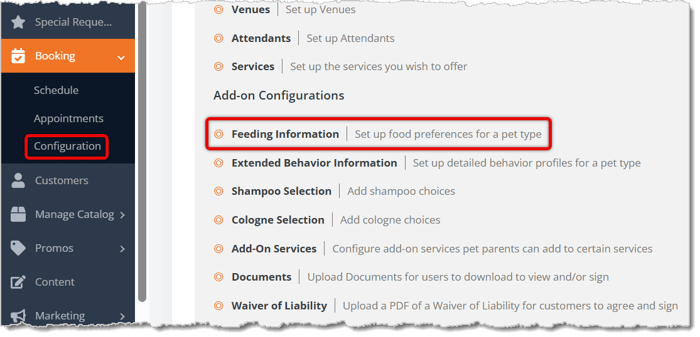
To reach the Feeding Information configuration page, go to Booking > Configuration > Feeding Information.
Here is everything you can view and use on this page:
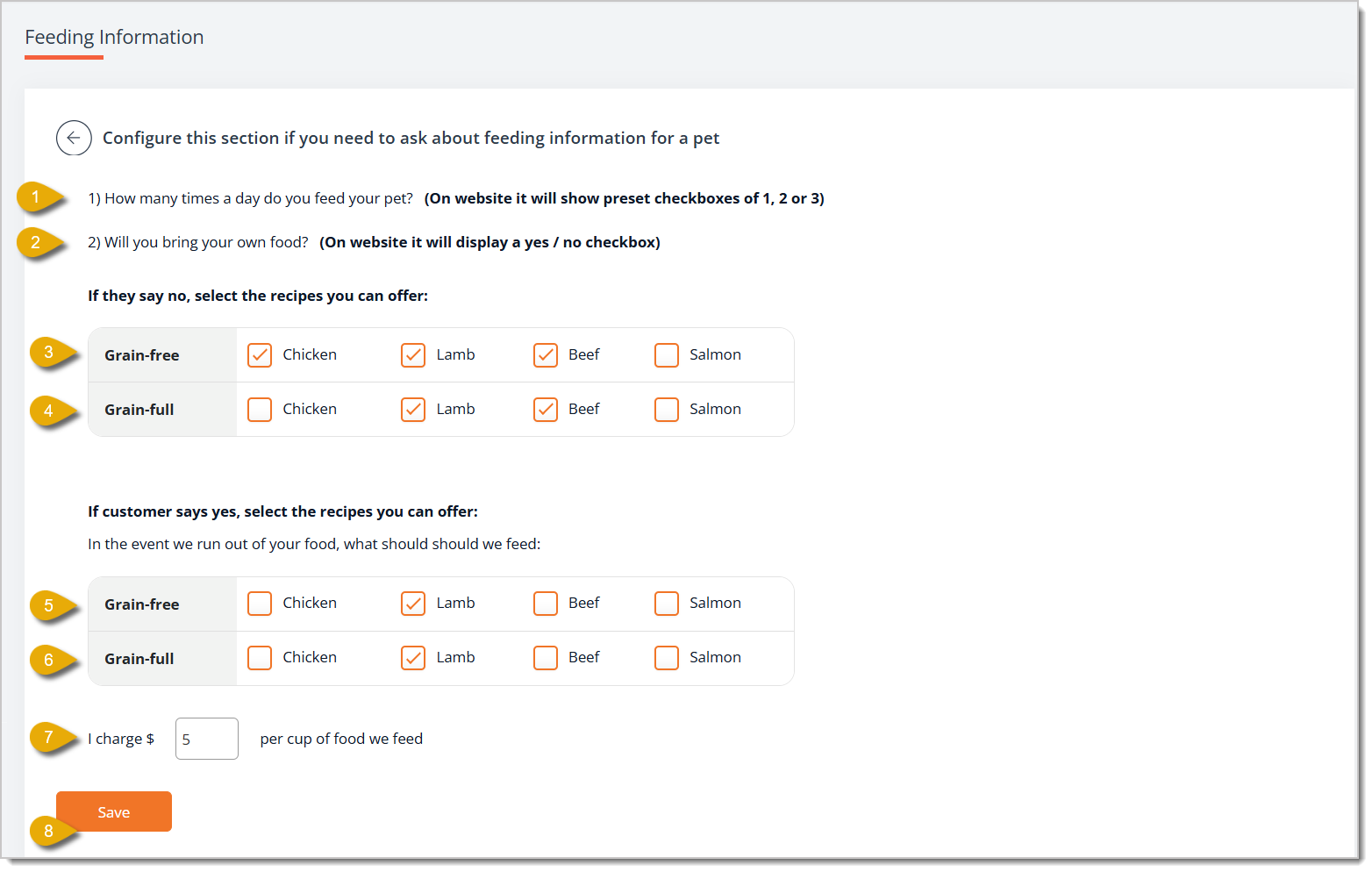
- How many times a day do you feed your pet? — Customers have to answer this mandatory question to let you know how many times a day they normally feed their pet and therefore how often your staff should feed their pet. Their options are 1, 2, and 3. Once the customer submits their answer, it's locked in — your store can't edit it.
- Will you bring your own food? — Customers have to answer this mandatory question to inform you if they will provide you with their own pet food. Their options are Yes and No. Once the customer submits their answer, it's locked in — your store can't edit it.
- Grain-Free (if customer will not bring their own food) — If a customer answers that they will not bring their own pet food, they can select what grain-free recipes you can feed their pet. In this section, check the box for each grain-free recipe you offer to customers.
- Grain-Full (if customer will not bring their own food) — If a customer answers that they will not bring their own pet food, they can select what grain-full recipes you can feed their pet. In this section, check the box for each grain-full recipe you offer to customers.
- Grain-Free (if customer will bring food but it runs out) — If a customer will bring their own pet food, they can select what grain-free recipes you can feed their pet in case you run out of their own food. In this section, check the box for each grain-free recipe you offer to customers.
- Grain-Full (if customer will bring food but it runs out) — If a customer will bring their own pet food, they can select what grain-full recipes you can feed their pet in case you run out of their own food. In this section, check the box for each grain-full recipe you offer to customers.
- I charge $ per cup of food we feed — Enter the dollar amount per cup you charge customers for feeding their pets with your in-house pet food.
- Save — Click on the Save button to save your feeding information configuration.
Related Topics
Booking Schedule
Booking Appointments
Booking Configuration 1
Booking Configuration 2
Checking Out a Booking Appointment
Extended Behavior Information
Waiver of Liability
Documents
Frequently Asked Questions
Q: A customer wants to change their answer to "How many times a day do you feed your pet?" or "Will you bring your own food?" after booking. Can I update it for them?
A: No. Once a customer submits an answer to either question, it's locked and can't be edited by your store. You'll need to track any changes separately, such as in the booking notes.
Q: What if a customer says they'll bring their own food, but it runs out during their stay?
A: Use the Grain-Free (if customer will bring food but it runs out) and Grain-Full (if customer will bring food but it runs out) sections to set which in-house recipes you can feed their pet as backup.
Q: How do I charge customers for feeding their pet with my in-house food?
A: Enter your rate in I charge $ per cup of food we feed. This price applies whenever you feed a pet from your own food supply.
Q: Do I have to offer both grain-free and grain-full recipes?
A: No. Only check the boxes for the recipes you actually offer — leave the rest unchecked.
Q: I have a question, but I can't find my answer here. How do I get more assistance?
A: You can ask any question at the number listed here. Contact our support team at (323) 370-0738 for the U.S. and (888) 370-2363 for Canada.







 Aug 10, 2026
Is this page helpful?
×Help us improve our articles