






Booking Schedule
📆 The Schedule page of the Booking area in the eTailPet system allows you to view, create, and mana
 Aug 10, 2026
📃 The Documents page of the Booking Configuration area lets you set up document types that customers must review, download, fill out, or sign as part of the booking process. You can require a signature, request a description, or upload your own file for customers to download, complete, and return. This article covers how to view your document types and how to add a new one. Take a look at what you can do here!

To get to this page, go to Booking > Configuration > Documents.
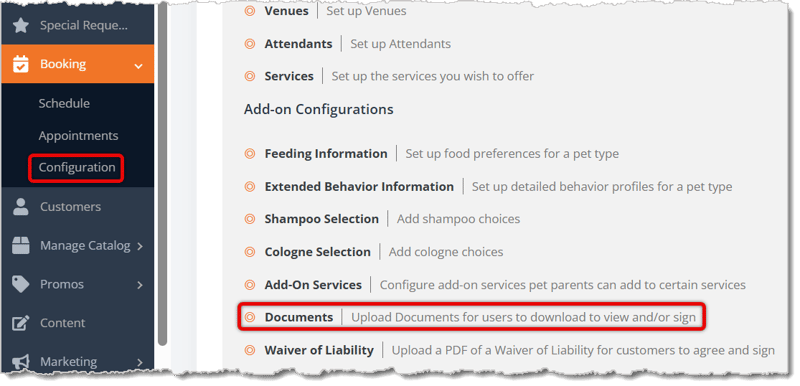
Here is how to work with your Documents:

Here is how to add a new document type for your customers:
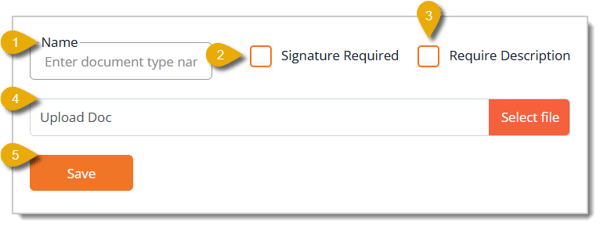
Your new document type will now be available to attach to services you require it for during the booking process.
Q: What is the difference between checking Signature Required and leaving it unchecked?
A: When you leave Signature Required unchecked and don't upload a file, the customer simply submits their own document, such as a vaccination record. When you check Signature Required, the customer must provide a signature at the time they submit or upload the document.
Q: Can I edit a document type after I create it?
A: The Documents page only allows you to add new document types. If you need to make changes to an existing one, contact our support team for assistance.
Q: I have a question, but I can't find my answer here. How do I get more assistance?
A: You can ask any question at the number listed here. Contact our support team at (323) 370-0738 for the U.S. and (888) 370-2363 for Canada.
Is this page helpful?
×Help us improve our articles