






Astro Loyalty Troubleshooting
⭐ If you're running into problems with the Astro Loyalty integration, there are ways to troubleshoot
 Aug 18, 2026
Excel doesn’t often play nice with UPCs for various reasons, so this article explains how to deal with and correct these issues. Take a look at how they work!

This video shows the correct way to format UPCs for importing. It also shows you how to troubleshoot formatting issues and what to avoid0.
⚠️Please Note: These instructions are provided for your convenience only. eTailPet does not offer support or troubleshooting for third party applications. For additional help, please utilize help resources from your spreadsheet program provider.
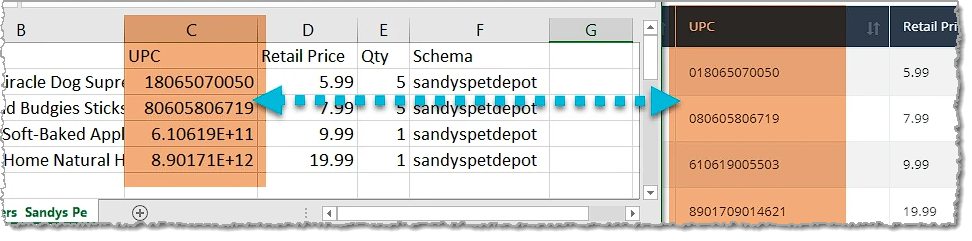
The example above is an export of a purchase order. On the left is the Excel file, and on the right is the onscreen view. If you compare the UPCs from each, you can see that they don’t match. Here’s why.
When you open a CSV spreadsheet in Microsoft Excel, it deletes leading zeroes and changes any digit greater than 12 to scientific notation. Here's how to reformat scientific notation and format UPCs to include leading zeroes.
If your Product UPC or System ID appears to have a Plus Sign symbol (+) in it, then Microsoft Excel has formatted it as scientific notation. This will cause issues with the import process, so these need to be reformatted.
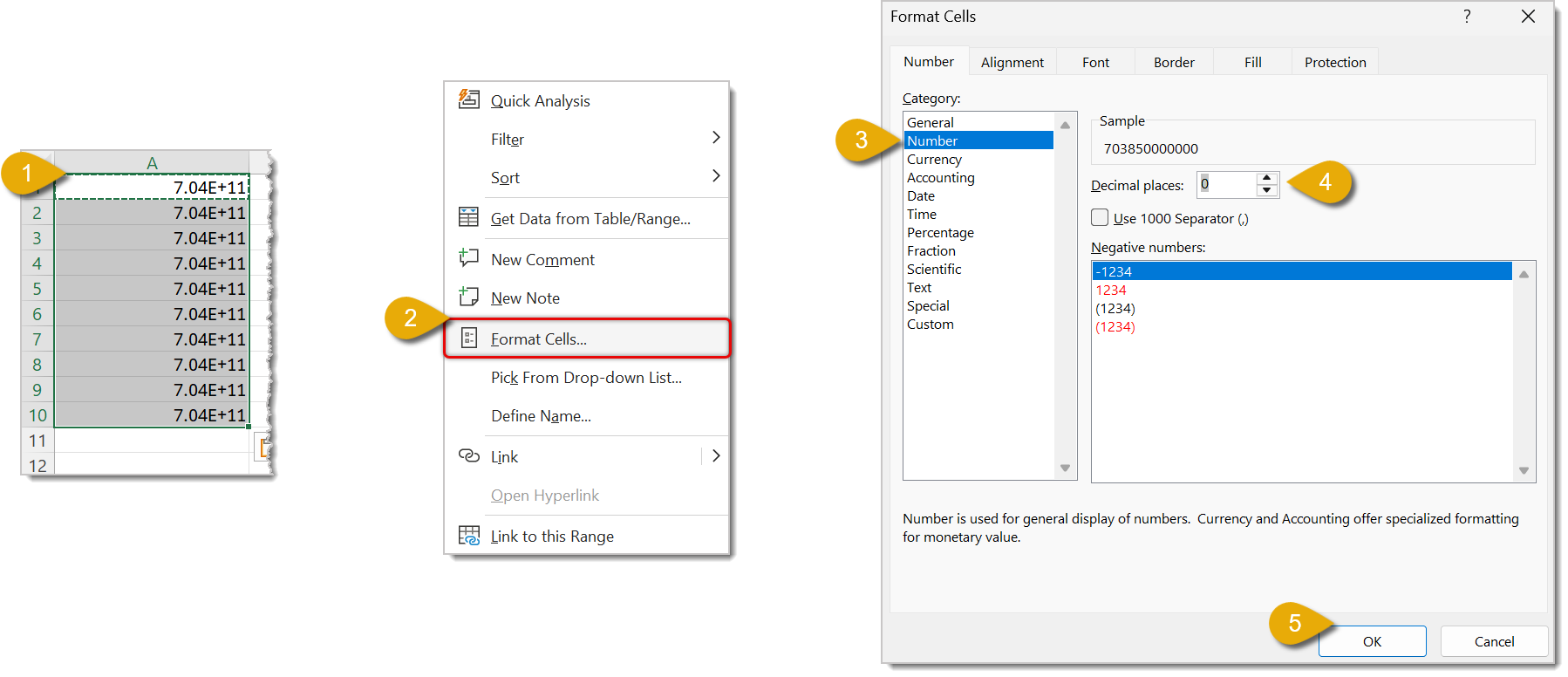
Since UPC is usually a 12-digit number, we can use a formula to make sure they are not deleted.
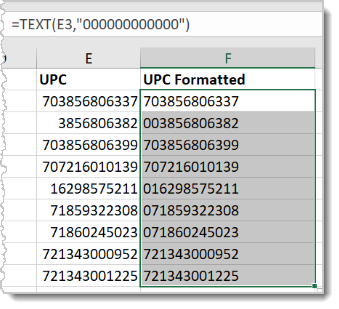
🐱Please Note: If any of your UPC rows are blank, this formula will fill it in with 12 zeroes, i.e. 000000000000. Be sure you don’t include all zeroes when you copy the formatted UPCs to the correct column.
If you prefer to save yourself the trouble of reformatting scientific notation after you've opened your file, you can take a few extra steps before opening it. This video guides you through the process:
Importing Products Best Practices and Troubleshooting
Q: I have a question, but I can't find my answer here. How do I get more assistance?
A: You can ask any question at the number listed here. Contact our support team at (323) 370-0738 for the U.S. and (888) 370-2363 for Canada.
Is this page helpful?
×Help us improve our articles