






Themes
🎨 You can edit the color and font themes of your eTailPet website by going to Themes. Read on to se
 Jun 09, 2026
🐭 In the eTailPet system, Max Per Cart and Quantity On Hand are two different fields set to limit products sold on your e-commerce website. This article will go over the difference between the two and how to set Quantity On Hand as the limit for your site.

The eTailPet system uses Max Per Cart by default to limit the amount you sell. However, you can also make the QOH act as a limit instead, so only products with a QOH of 1 or more can be sold from your website.
😸 Please Note: We recommend using the QOH method because it prevents you from selling more than what you have in stock, and it maintains an accurate inventory number.
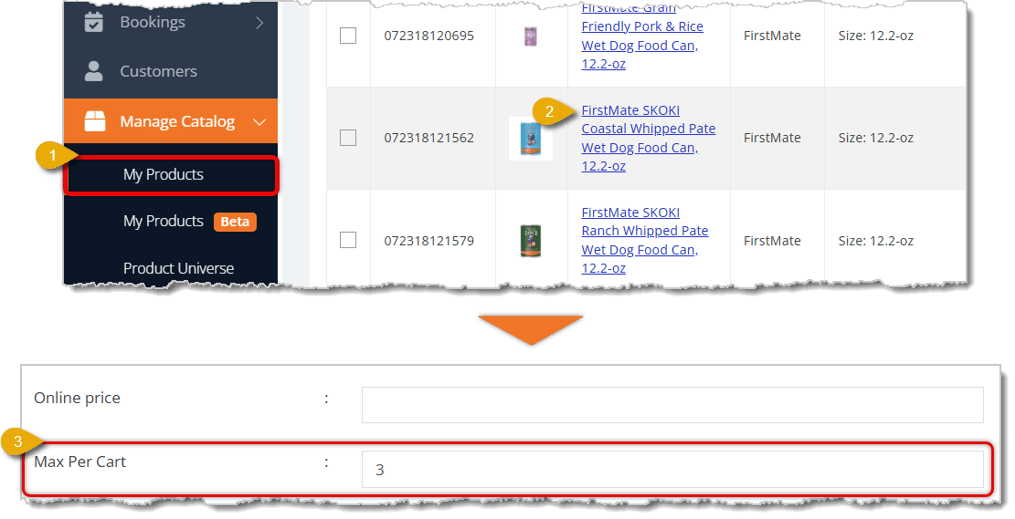
You can set the Max Per Cart for individual products, meaning each customer can only add that amount of a product to their online shopping cart. Here is how you can set the Max Per Cart for each product:

If you want to instead set the Product's Quantity on Hand as the limit for online carts, this is how you enable that setting:

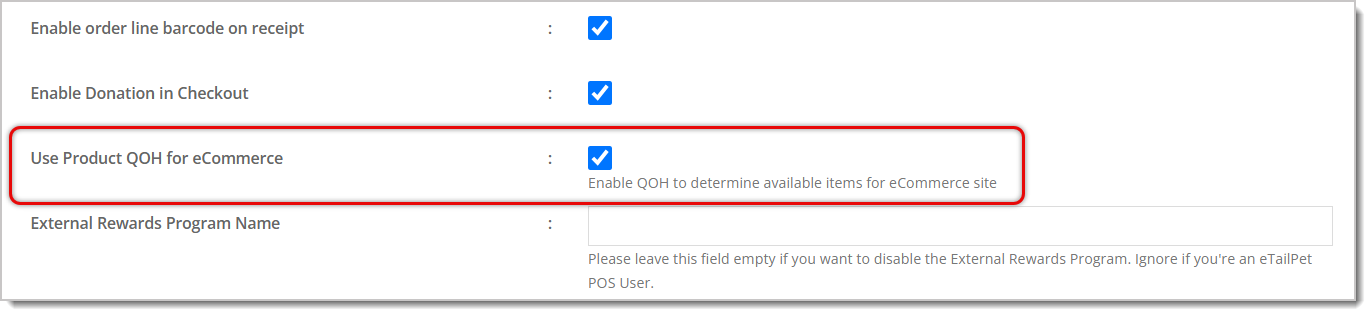

😸 Please Note: Before enabling the QOH, make sure your inventory is accurate. You can do inventory counts as needed to make any corrections.
If you want to learn how to set QOH for a product, read our article about Inventory Quantity On Hand linked here.
Q: If I enable QOH for e-commerce, does Max Per Cart stop working?
A: Yes. Once you enable QOH as the limit, it takes over from Max Per Cart, and only products with 1 or more in stock can be sold online.
Q: Why does eTailPet recommend using QOH instead of Max Per Cart?
A: Max Per Cart is just a flat number regardless of actual stock. QOH stops you from overselling online and keeps your inventory count accurate.
Q: What should I do before turning on QOH for e-commerce?
A: Make sure your inventory is accurate first. Run inventory counts to fix any discrepancies before you flip this on.
Q: Is QOH shared across all my stores, or specific to one?
A: QOH is tracked separately for each store.
Q: I have a question, but I can't find my answer here. How do I get more assistance?
A: You can ask any question at the number listed here. Contact our support team at (323) 370-0738 for the U.S. and (888) 370-2363 for Canada.
Is this page helpful?
×Help us improve our articles