If you wish to give certain customers in-house credit accounts, you can do so from their Customer profile page. This article will show you how to set that up, how to use it on the New Sale page, and how to manage those accounts. Take a look at what you can do!

⚠️Please Note: Invoicing and payment for house credit is typically NOT done through the eTailPet POS. However, as a work around, you can do the following: Create a Private Product with the Price Type set to Variable and call it In-House Credit Account Payment, or something similar. When the customer wants to pay the amount they owe, load the "product" into New Sale and set the Price to the amount they owe, then they can pay it however they like.
Configure In-House Credit for a Customer
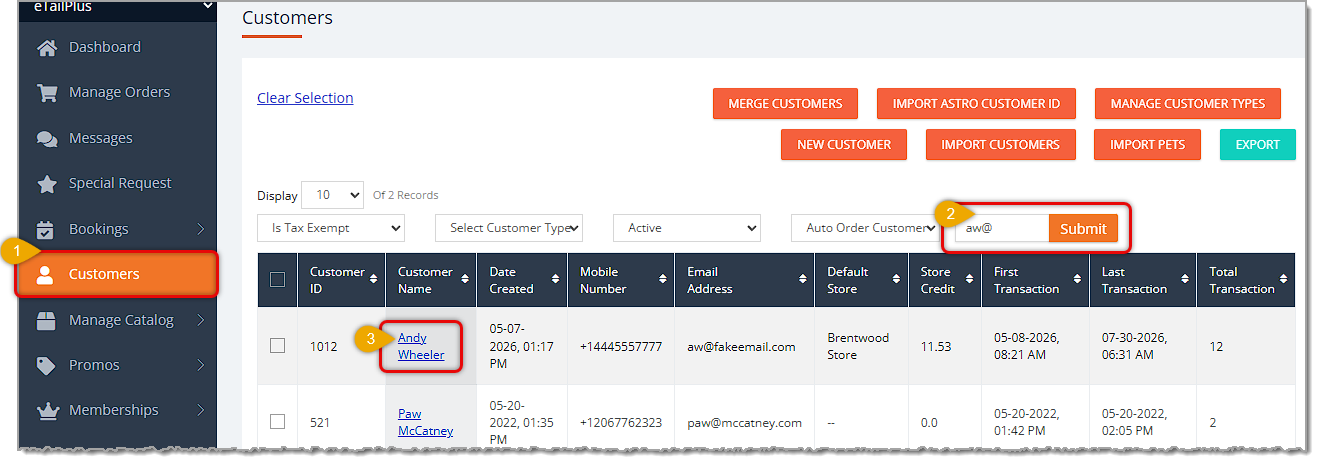
Here is how to set up a customer for In-House Credit:
- In the main system menu on the left, click on Customers.
- Find the Customer you want using the Search field, or scroll through your list and pages.
- Click on the customer's Name. The Customer's Details page will open for you.
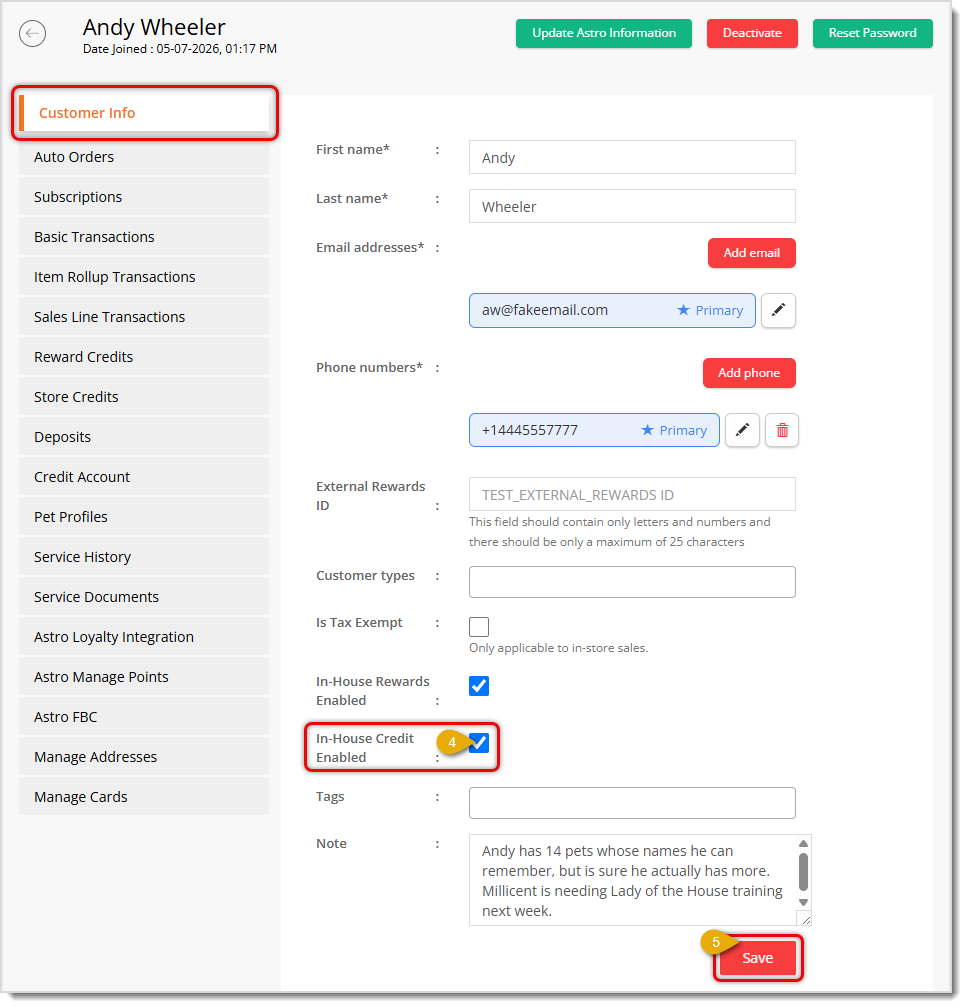
- On the Customer Info tab (which loads by default), scroll down about half way, find the In-House Credit Enabled setting, and click in the checkbox.
- After completing any other adjustments needed, scroll to the bottom of the page to click on the Save button and save your changes.
The customer will now have the option of paying using In-House Credit in New Sale, as described below.
Using On Account as a Payment Method in New Sale
When a customer that has In-House Credit enabled goes to pay for an in-store purchase, one of their payment options will be On Account.
💡Please Note: The payment methods for Store Credit and On Account can seem similar, and understanding the difference between them is important: Store Credit is an amount given to the customer as a Refund and will display as an Available amount to be used in the store. On Account is for customers that have In-Store Credit enabled and once they start charging to the account, they'll see a negative amount Outstanding for that payment method, as pictured below.
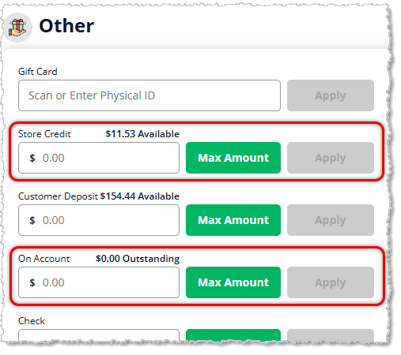
Here is how to use On Account as a payment method for an in-store transaction:
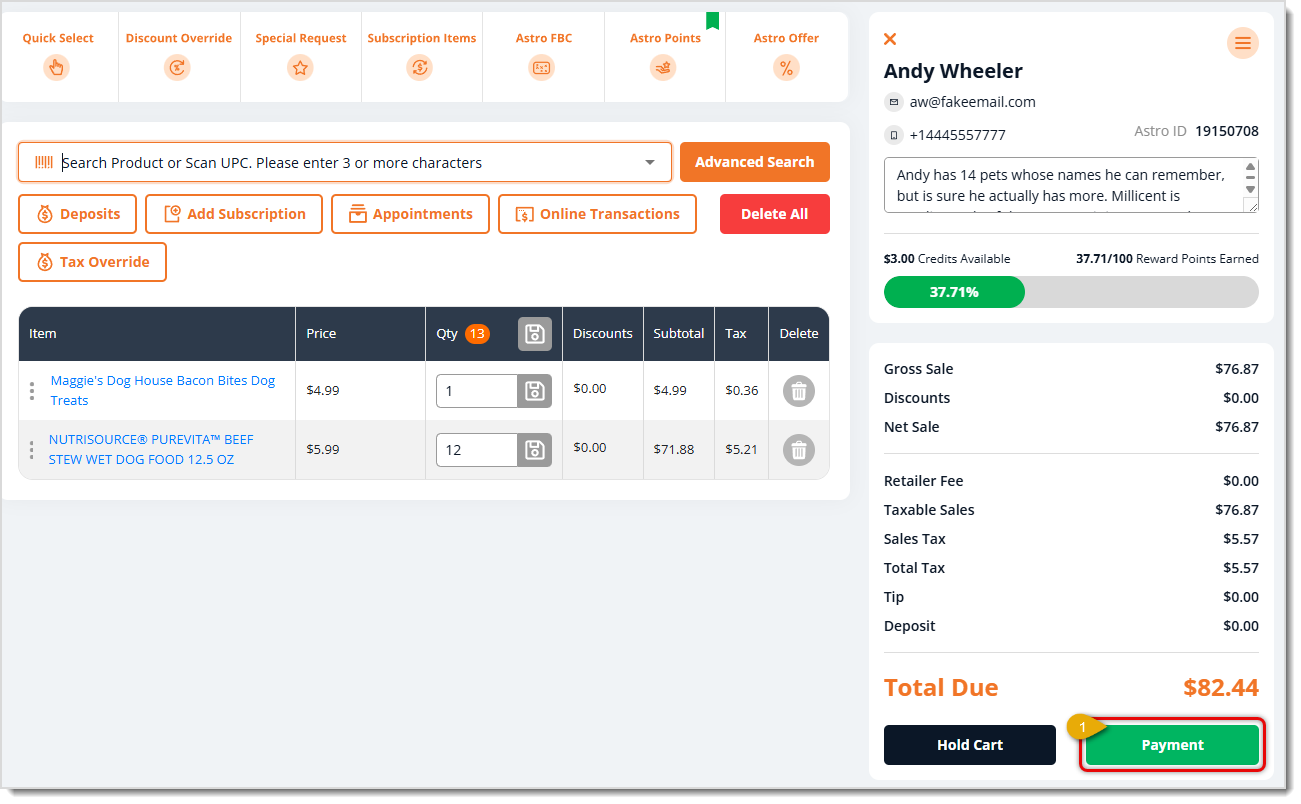
- Once you have the Customer loaded and the transaction items in place, when the customer is ready to check out, click the Payment button in the lower right of the New Sale page (highlighted in the image above).
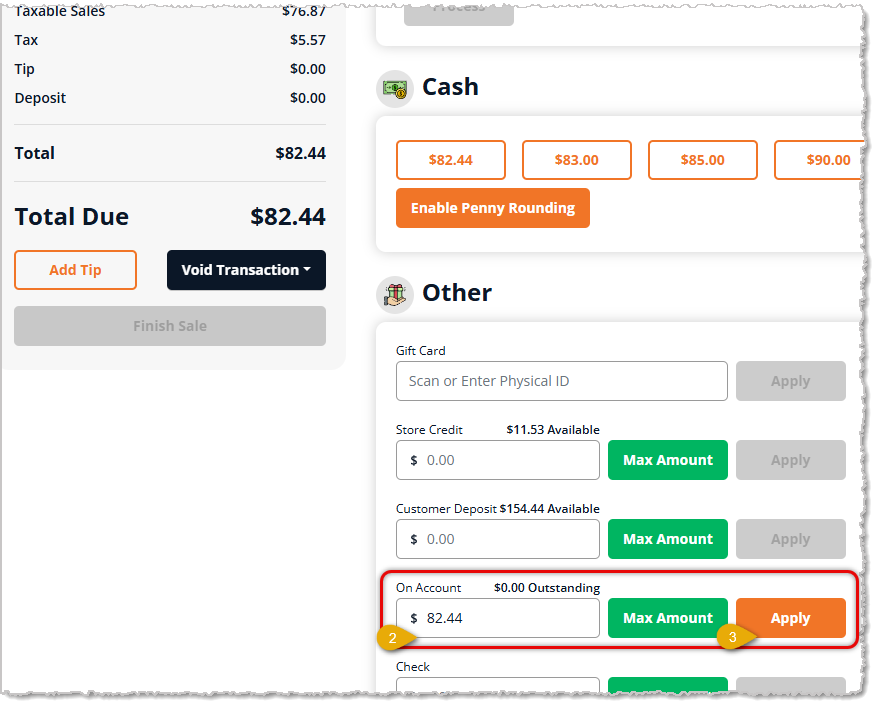
- In the Payment panel, in the Other payment methods area, find On Account. You can enter the amount the customer wants to use as In-House Credit, or you can click the Max Amount button to load the full transaction Total Due into the On Account area. In this example, the customer is paying the full amount On Account.
- Click the Apply button to set the amount to be paid using On Account. You can click the Remove button if the customer changes their mind and wants to pay a different amount or use a different method.
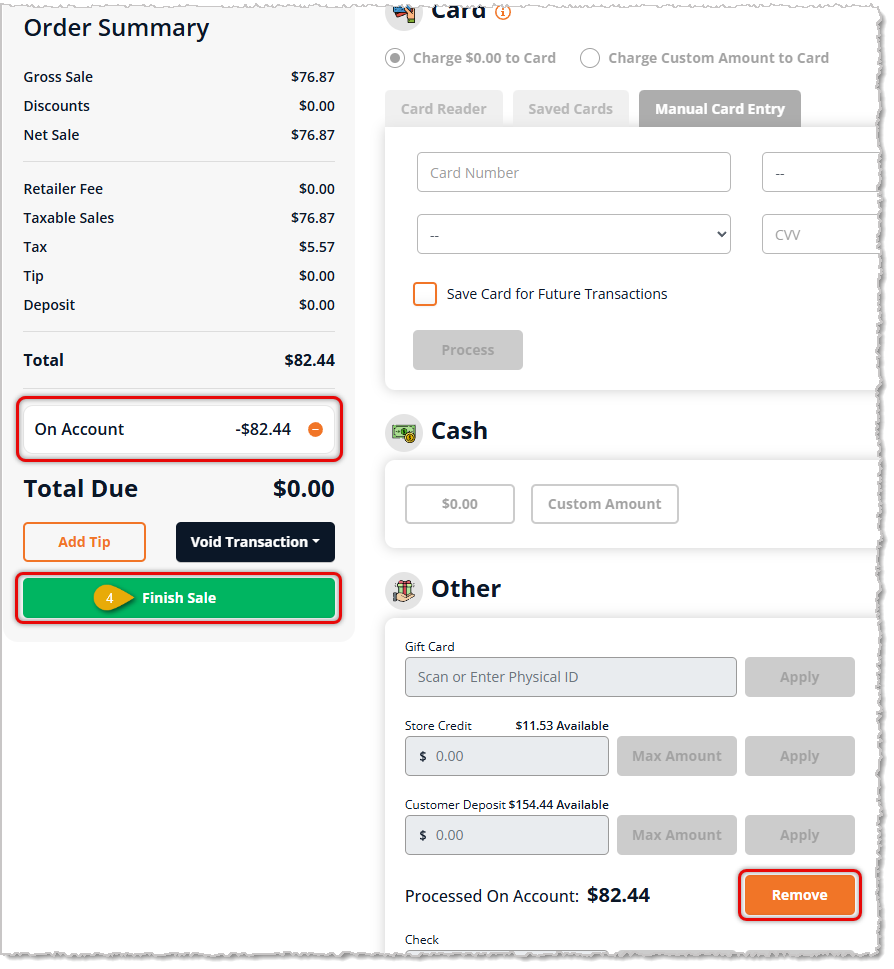
- You'll see the amount for On Account being used as In-House Credit in the Order Summary area that's in the upper left. Click the Finish Sale button to complete the transaction.
Managing Customer In-House Credit Account Balances
There are two primary areas where you'll manage the balances your customers have on their In-Store Credit accounts: The Payment Report and the Credit Account tab of the Customer Profile.
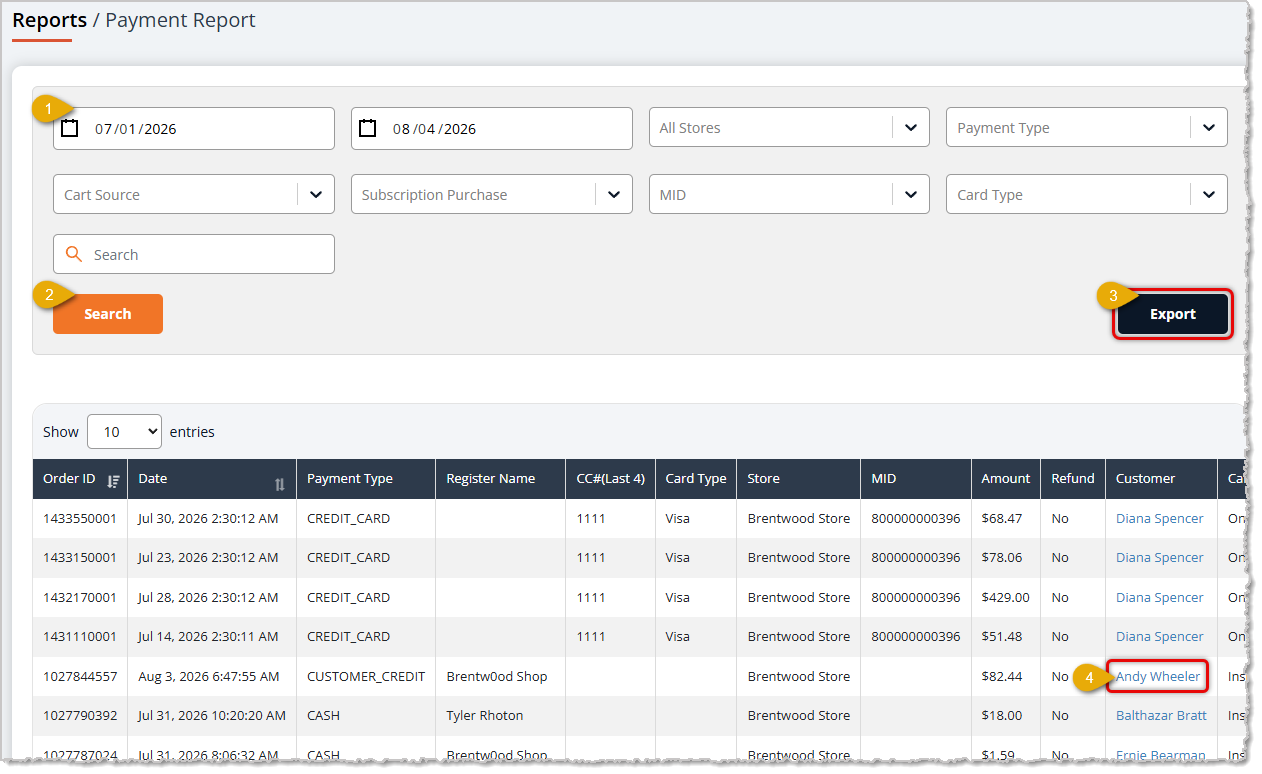
- You'll use the Payment Report (Reports > Payment Report) to see how much customers owe. Set the Date Range and Filters the way you need to find payments made via Customer Credit in the Payment Type column. This is for On Account payments using the customer's In-House Credit Account.
- Click the Search button to load customers that match your search criteria.
- From there, you can click the Export button to save the data in an Excel file and work with it in a spreadsheet. This is a convenient way to work up Invoices and manage paid and unpaid balances, which is not something the eTailPet system currently does.
- When a customer pays their balance or if you need to check for unpaid balances, you can click on the Customer's Name to open the Customer's profile. On the Credit Account tab, you can mark amounts the customer owes with the Verify button to verify payment. Doing so marks the amount as Settled.
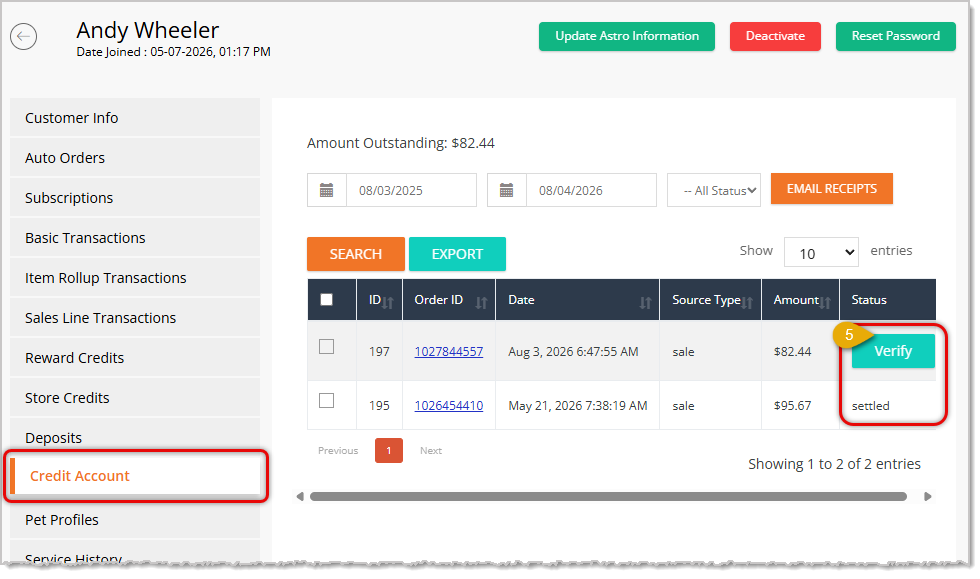
Since the system doesn't currently handle payments toward In-House Credit balances, you can use the workaround explained in the Note at the top of this page to take payments as needed, and then mark them as Verified using the steps above.
Related Topics
Customers Overview
Customers in New Sale
Payment Types in New Sale
Payments Reports
Frequently Asked Questions
Q: I have a question, but I can't find my answer here. How do I get more assistance?
A: You can ask any question at the number listed here. Contact our support team at (323) 370-0738 for the U.S. and (888) 370-2363 for Canada.







 Jul 31, 2026
Is this page helpful?
×Help us improve our articles