Dashboard Images

May 29, 2026
🖼️ Whenever an employee logs into the eTailPet system, they'll first see the Dashboard by default, which will show Dashboard Insights and whatever images you've uploaded. You can use these images for important internal communication since the Dashboard is the first thing everyone will see. For example, you can use Dashboard images to remind employees of opening / closing procedures or show products that you want them to promote in-store. Keep reading to learn how to upload images to your Dashboard for more effective communication!

Upload Dashboard Images
To upload images to your Dashboard, do the following:
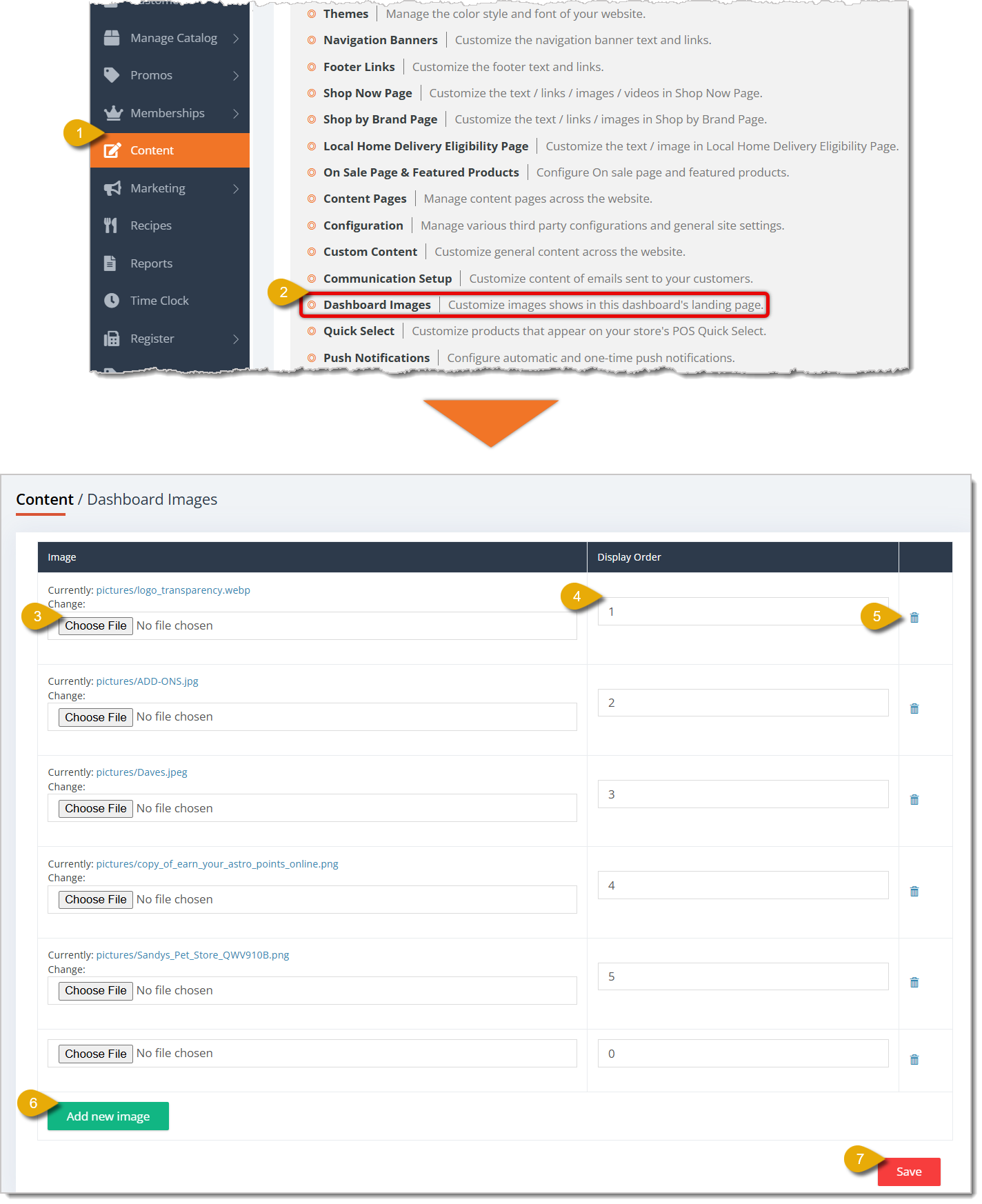
- Go to Content in the main menu.
- Click on Dashboard Images in the Content menu.
- In the Dashboard Images area, you can upload an image by clicking on Choose File, under the Image column in the table.
- Enter the Display Order as a whole number. The number indicates where the image will appear from the top. For example, entering 1 for an image would place that at the very top, and entering 2 would place that image just below the first one.
- Click on the Trash Can icon on the right of an image's entry in the table to remove the image.
- If you want to add another image, click on Add New Image to create another table entry.
- Click on Save in the bottom right to save your uploaded images and update the Dashboard.
To see some examples of how this might look, click the link below for the Admin Dashboard Tour article.
Related Topics
Admin Dashboard Tour
Themes
Navigation Banners
Content Pages
Communication Setup
Frequently Asked Questions
Q: I have a question, but I can't find my answer here. How do I get more assistance?
A: You can ask any question at the number listed here. Contact our support team at (323) 370-0738 for the U.S. and (888) 370-2363 for Canada.
🎨 You can edit the color and font themes of your eTailPet website by going to Themes. Read on to se
🔗 You can add navigation links near the top of your eTailPet online store, which customers can clic
🏡 The Local Home Delivery Eligibility Page is where customers can check if their address is eligibl







Is this page helpful?
×Help us improve our articles