📆 The Attendants page of the Bookings area is where you can configure which staff members are available for services like grooming or training. You can add new attendants, set primary communication methods, set pet size limits for each staff member, and more. See what's here for you!
Attendants
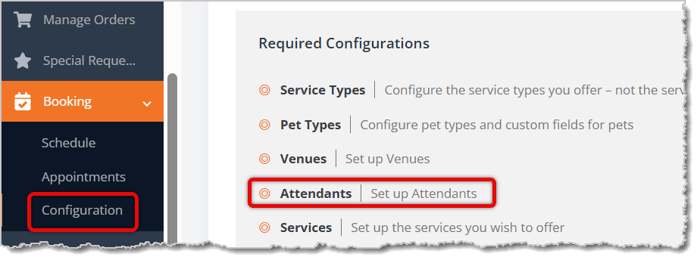
To open the Attendants page, go to Bookings > Configuration > Attendants.
The Attendant List page shows every staff member eligible to perform bookable services. The table displays the Attendant Name, Attendant Title, Attendant Phone, Attendant Email, Revenue Share, Capacity Constraints, and Participant Eligibility Constraints for each attendant. A green checkmark next to a phone number or email address indicates the attendant's preferred method of communication.
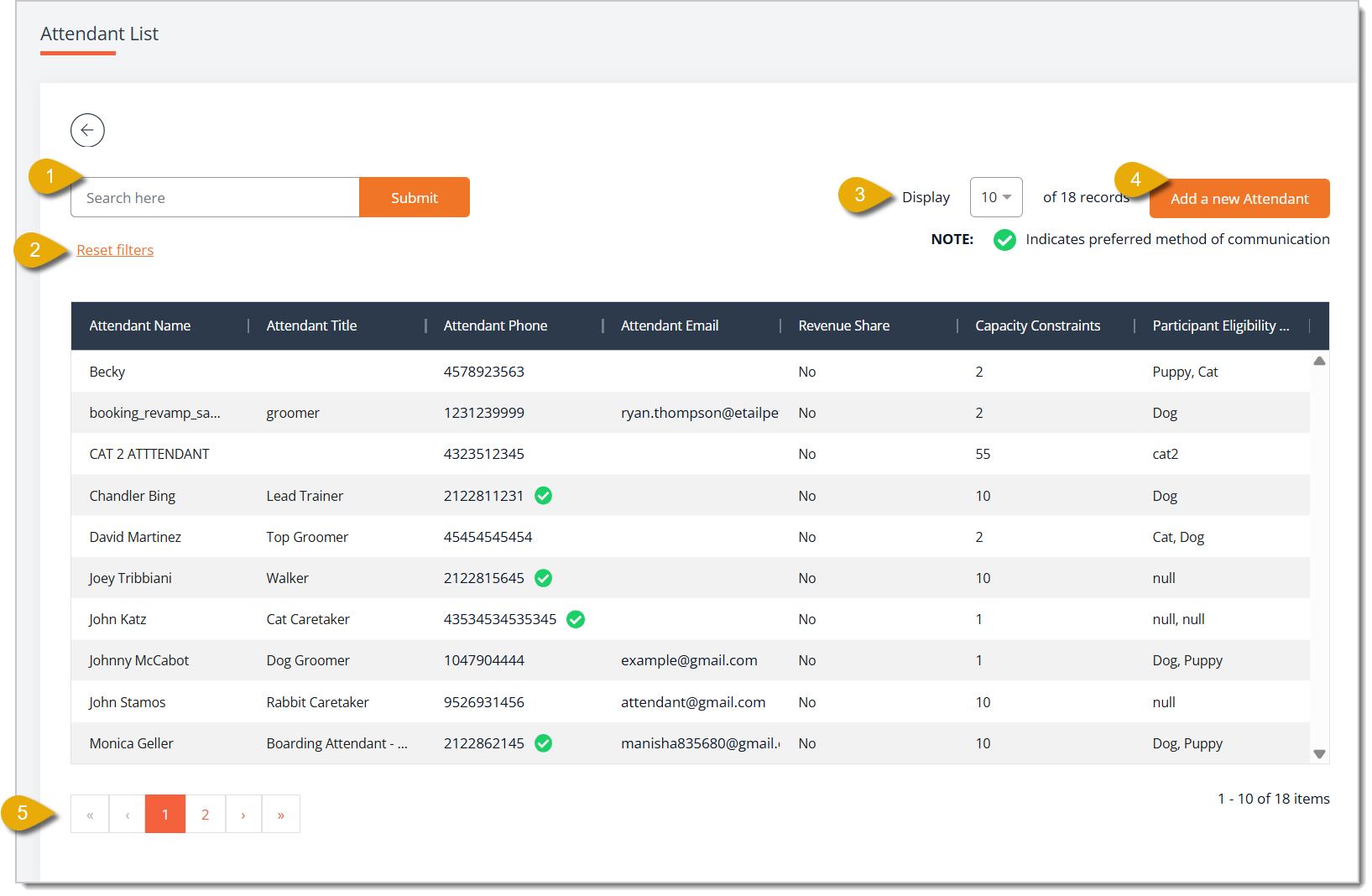
- Search — Enter a keyword and click Submit to filter the attendant list.
- Reset Filters — Click this link to clear the filters and display all attendants again.
- Display — Select how many records will display per page from this drop-list.
- Add A New Attendant — Click this button to open the Add New Attendant page and create a new attendant using the fields below.
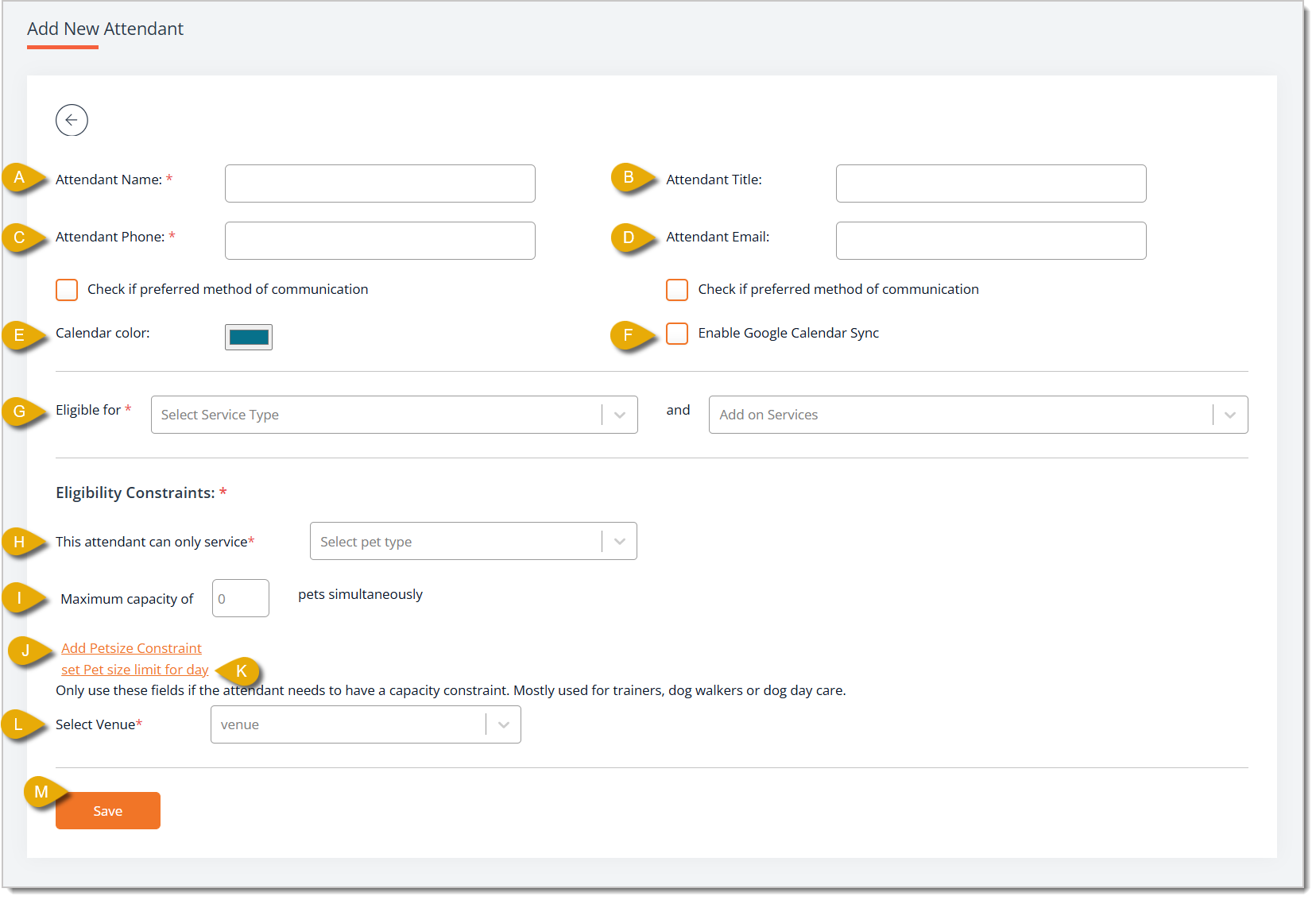
- Attendant Name* — Enter the attendant's full name.
- Attendant Title — Enter the attendant's job title, such as Groomer or Lead Trainer.
- Attendant Phone* — Enter the attendant's phone number. Check the box for Check If Preferred Method of Communication below if phone is how this attendant prefers to be contacted.
- Attendant Email — Enter the attendant's email address. Check the box for Check If Preferred Method of Communication below if email is how this attendant prefers to be contacted.
- Calendar Color — Click the color swatch to select a color that represents this attendant on the booking calendar.
- Enable Google Calendar Sync — Check this box to sync this attendant's appointments with their Google Calendar. Please Note: For the sync to work, you must have a Gmail-affiliated email address entered for the attendant.
- Eligible For* — Select a service type from the Select Service Type drop-list and select any applicable add-ons from the Add-On Services drop-list to set what this attendant can do. You can select as many Service Types and Add-On Services as needed.
- This Attendant Can Only Service* — Select the Pet Types this attendant is eligible to work with from the drop-list. You can select as many as needed.
- Maximum Capacity Of — Enter the number of pets this attendant can handle in a day.
- Add Pet Size Constraint — Click on this link to add limits to the size of pets this attendant can handle. This is primarily meant for trainers, dog walkers, or day care attendants.
- Set Pet Size Limit For Day — Click on this link to add limits to the size of pets this attendant can handle in one day. This is primarily meant for trainers, dog walkers, or day care attendants.
- Select Venue* — Select the Venue or Venues where this attendant works from the drop-list. You can select as many as needed.
- Save — Click this button once you have finished entering the attendant's details. If you are editing an attendant this button will read Update.
- Navigate Pages — Click on the Arrow Buttons on the bottom of the page to navigate between pages. You can also click on the Page Number Buttons to skip to certain pages.
* Required Field
Related Topics
Booking Schedule
Booking Appointments
Checking Out a Booking Appointment
Venues
Pet Types
Frequently Asked Questions
Q: How do I make sure a specific attendant only works with certain pets?
A: On the Add New Attendant page, use the This Attendant Can Only Service drop-list under Eligibility Constraints to limit that attendant to specific pet types.
Q: Can an attendant sync their bookings with Google Calendar?
A: Yes. Check Enable Google Calendar Sync on the attendant's profile — just make sure their email is a Gmail address, since that's required for the sync to work.
Q: Can I limit how many pets an attendant handles at once?
A: Yes. Use Maximum Capacity Of to cap the daily number of pets, or Add Pet Size Constraint / Set Pet Size Limit For Day to limit by pet size — handy for trainers, dog walkers, or day care attendants.
Q: Can an attendant work at more than one venue?
A: Yes. Select Venue lets you pick as many venues as needed for that attendant.
Q: How do I set an attendant's preferred contact method?
A: Check the box for Check If Preferred Method of Communication next to either their phone number or email — whichever they prefer.
Q: I have a question, but I can't find my answer here. How do I get more assistance?
A: You can ask any question at the number listed here. Contact our support team at (323) 370-0738 for the U.S. and (888) 370-2363 for Canada.







 Aug 10, 2026
Is this page helpful?
×Help us improve our articles