






Payments Bank Account Update
If the need to change the bank account that your payouts are deposited in a new bank account can be
 Aug 07, 2026
Local Inventory on Google is designed for retailers who have a brick and mortar physical location. With the eTailPet system's POS integration with Google, you now have a way to seamlessly upload your products to Google . It’s completely free to use, and helps you promote your products through a local Google search. No extra hardware is required as it works directly through the web application. Take a look at what it can do for you!

Our integration with Google allows you to easily sync your in-store products to your Business Profile on Google so they can stand out across Google Search, Google Maps, and the Shopping tab. Now you can let your potential customers know you have what they’re searching for, before they visit your store. It’s all done automatically and at no cost to you.
Where your in-store products can appear on Google:
 Complete the free Local Inventory on Google integration steps for eTailPet POS listed below. Product images and descriptions will automatically be pulled from the manufacturer’s barcode and added to Google. You don’t need to worry about doing any time-consuming manual work.
could we add alt text to these images
 When customers search for products in their area, your products can appear in Google Searches, Google Maps, and the Shopping tab of search result pages, alongside your contact details and opening hours. That kind of visibility is priceless for any retail business, and Google provides it for free.
 Local Inventory on Google is available as a free service to integrate directly to your eTailPet POS system. You can upload your Local Inventory on Google and set up your Business Profile. This will also increase the likelihood of your products, and your store, showing up in product-related searches on Google.
Local Inventory ads is an optional premium feature, where you can create ads for your in-store products in two clicks.
⚠️Please Note: Local Inventory on Google integration is only available for eTailPet physical store retailers and does not work for your storefront website. Also, in order for Local Inventory on Google to work for your store, you must be using UPC/EAN barcodes on your products.
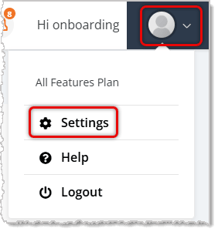
To get to this page, click the User icon in the top right of the system, then click Settings.
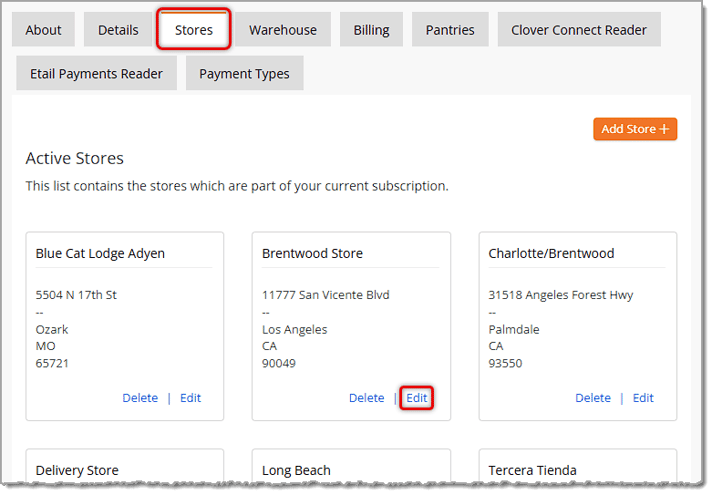
On the Settings page, click the Stores tab.
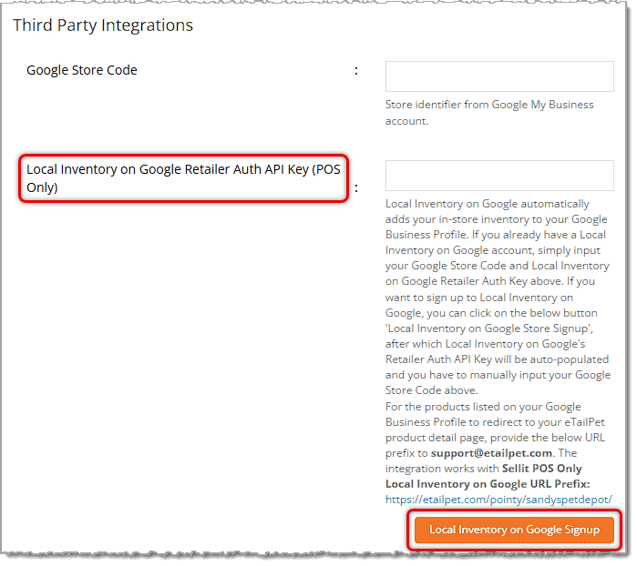
Scroll down to the Third Party Integrations section of the Edit Store page; for the Local Inventory on Google setting, click the Local Inventory on Google Signup button.
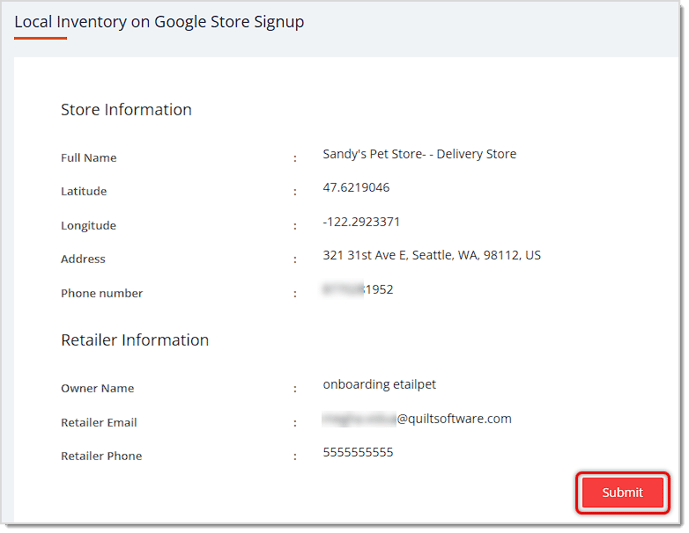
On the Local Inventory on Google Store Signup page, you'll see the details about your store. If everything looks correct, click the Submit button.
The API Key for Local Inventory on Google on your Edit Store page in the Third-Party Integrations area will auto-populate for you. Go to the page to confirm it is in place.
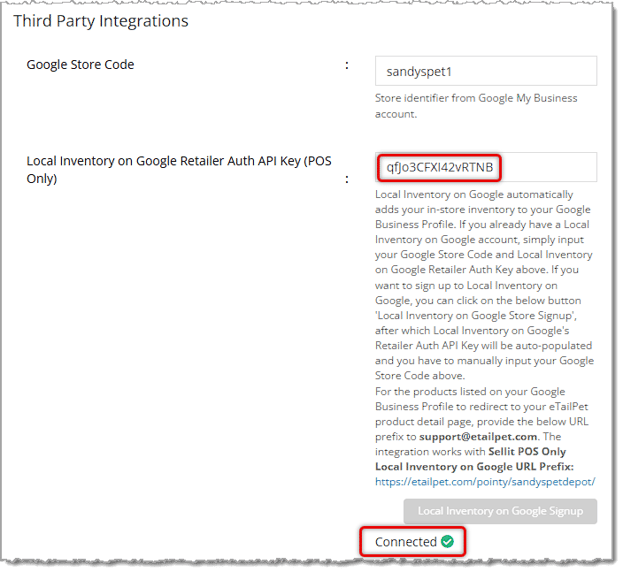
You will need to add your Google Store Code pictured above from your Google Business Profile if you have multiple stores so Google will know for which location the inventory is integrated. If you have not yet set up your Google Business Profile, you can learn how to do so by clicking here.
Click the Save button either in the upper or lower right of the page and you're all set! Now when pet parents search top pet brands in your area with in Google, your store will start showing up in the shopping search results. When pet parents click on your products, they will immediately be directed to your webstore to add the product to their cart. So simple!
Q: I am already using Local Inventory on a Google device. How do I switch over to using Local Inventory on Google on my POS?
A: Contact https://support.google.com/business/gethelp to start using Local Inventory on Google on your eTailPet system.
Q: What information/data does Local Inventory on Google receive when I connect it to my eTailPet system?
A: Local Inventory on Google integrates with your eTailPet system by collecting all of your products' barcode numbers (UPC/EAN). We then find an image and description to match each one from our comprehensive database. This then goes on your Local Inventory on Google Page. To get the most out of Local Inventory on Google, we need access to your eTailPet inventory, stock levels, and sales history (to estimate stock levels on your page). Your store's data is important to us and we ensure that it is protected at all times.
Q: How do I access my Local Inventory on Google account?
A: After you sign up to Local Inventory on Google, you will be able to manage everything directly from your Google Business Profile. You can find more information on how to do this here. add link
Q: How much does Local Inventory on Google cost for integrations?
A: The core Local Inventory on Google service is completely free for integration eTailPet POS users. The core service includes your Local Inventory on Google Page, retailer dashboard, and access to SWIS.
Q: Can I use the integration if I am an e-commerce only eTailPet retailer?
A: No, since real-time data is needed to power your product information online, the integration is only available for eTailPet retailers.
Q: How do I access my eTailPet Payments or CardPointe dashboard?
A: On the Details tab, click the eTailPet Payments icon to log in to your payments dashboard, or click the CardPointe icon to access your Clover Connect dashboard.
Q: I have a question, but I can't find my answer here. How do I get more assistance?
A: You can ask any question at the number listed here. Contact our support team at (323) 370-0738 for the U.S. and (888) 370-2363 for Canada.
Is this page helpful?
×Help us improve our articles