






Payments Bank Account Update
If the need to change the bank account that your payouts are deposited in a new bank account can be
 Aug 06, 2026
The About tab on the Settings page of the eTailPet system displays the profile details for the logged-in user, including their name, email, phone number, and store access. This article covers how to view your profile information and how to edit it. Take a look at what you can do here!
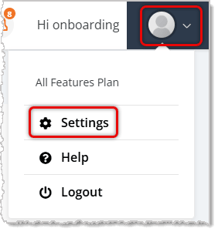
To get to this page, click on your user icon in the top right of the page, then click Settings. Click on the About tab in Settings.
Your About tab simply shows you the current information about your User account in the system. You are able to edit your details from here, if needed.
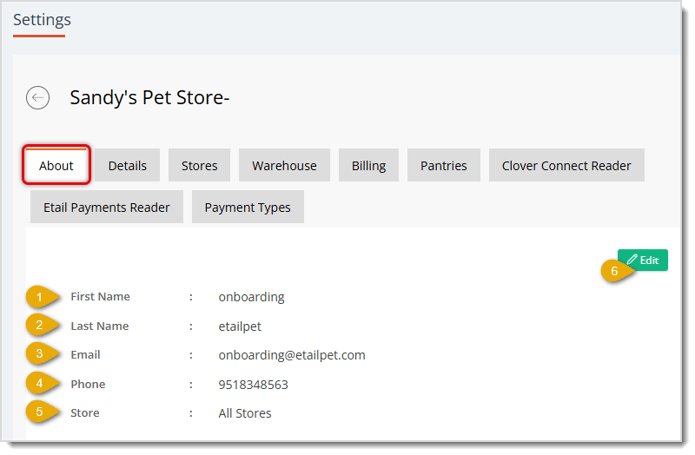
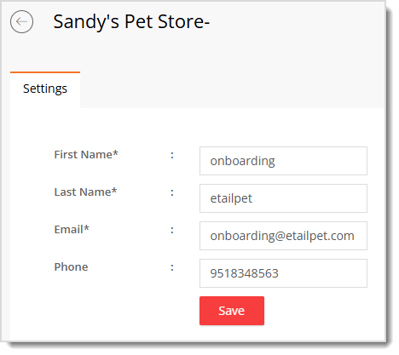
Here is how to work with your profile information on the About tab:
Settings: Adding and Editing Stores
Q: What does the Store field show?
A: The Store field shows which store location(s) your user account can access. If your account can access every store, this field displays All Stores.
Q: Why can't I edit the Store field?
A: The Store field is view-only on both the About tab and the Profile Edit page. Store access is set by your account's configuration.
Q: I have a question, but I can't find my answer here. How do I get more assistance?
A: You can ask any question at the number listed here. Contact our support team at (323) 370-0738 for the U.S. and (888) 370-2363 for Canada.
Is this page helpful?
×Help us improve our articles