






Holding and Resuming Transactions
Sometimes you have to put transactions on hold so the customer can come back later to complete it. T
 Apr 28, 2026
🐶 The eTailPet system enables you to offer customers discounts by overriding the original price. Read this article to learn how easy it is to apply discounts to transactions in the eTailPet Register!

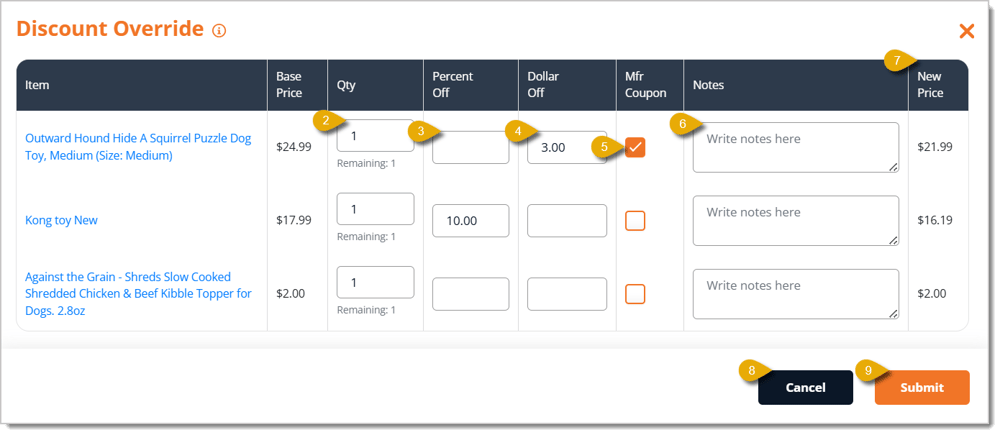
You can use Discount Override if you need to manually apply a discount to a cart. Here's how to apply a Discount Override to a transaction:

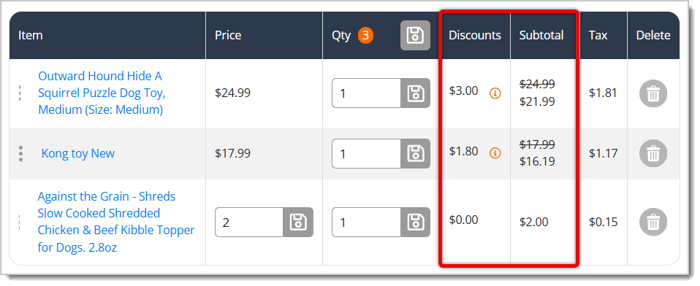
The Discounts and Subtotal columns in the New Sale Screen will update according to the override.
Discounts and Promotional Reports
Q: I applied a discount, but only some of the items in the line were discounted. Why?
A: Discount Override applies per item, not to the subtotal, based on the number you enter in the Quantity field. If a customer is buying 5 of the same item and you enter 2, only 2 of the 5 are discounted. Enter the full quantity if you want the discount applied to all of them.
Q: Should I use the percentage field or the dollar amount field?
A: Use whichever matches the discount you're giving. The percentage field accepts a value between 1 and 100, and the dollar amount field accepts a value between 0.01 and the item's base price.
Q: What does the Manufacturer Coupon checkbox actually change?
A: It changes how tax is calculated. When the box is checked, the customer pays the original amount of sales tax for the item. When it's left unchecked, tax is applied to the total after the discount is taken off.
Q: Can I record why an item was discounted?
A: Yes. Use the Note field in the Discount Override window to explain the reason — for example, that an item was marked down because it's close to its best-by date.
Q: I have a question, but I can't find my answer here. How do I get more assistance?
A: You can ask any question at the number listed here. Contact our support team at: (323) 370-0738 for the U.S. and (888) 370-2363 for Canada.
Is this page helpful?
×Help us improve our articles