






Product Reviews
 Jul 30, 2026
Build trust, boost conversions, and let your customers do your best selling for you. Product Reviews is a native ratings and reviews experience built right into your eTailPet storefront and Retailer Dashboard — no third-party widgets, no extra logins, no separate billing.
Shoppers can rate and review the products they love, and you get a simple dashboard to view, filter, and moderate every review you receive. This article will show you how the eTailPet system’s Product Reviews feature works, how to enable it, and how to manage your reviews in your Dashboard. Take a look at what’s here for you!

Why Customers and Retailers Love It
- Sell with Social Proof of Satisfaction: Star ratings appear on your product list and product pages, helping shoppers buy with confidence.
- Ratings Build Faster: Star ratings are pooled across all eTailPet retailers, so popular products show meaningful ratings sooner, even if you're just getting started. The written reviews shown on your site are always your own.
- You Stay in Control: Every review passes through moderation before it goes live, and you can publish, hide, or restore any review at any time.
- Built-In and Fully Managed: Product Reviews replaces Stamped.io. When it's enabled, native reviews appear on your storefront, Stamped widgets are hidden, and Stamped's post-order review emails stop sending automatically.
Getting Started
Requirements
- Your eTailPet plan must include Marketing.
- The Dashboard user that enables the feature (see instructions below) must be an Admin or have a role with Marketing Access permission.
Turn It On
In the main system menu on the left, go to Content > Configuration.
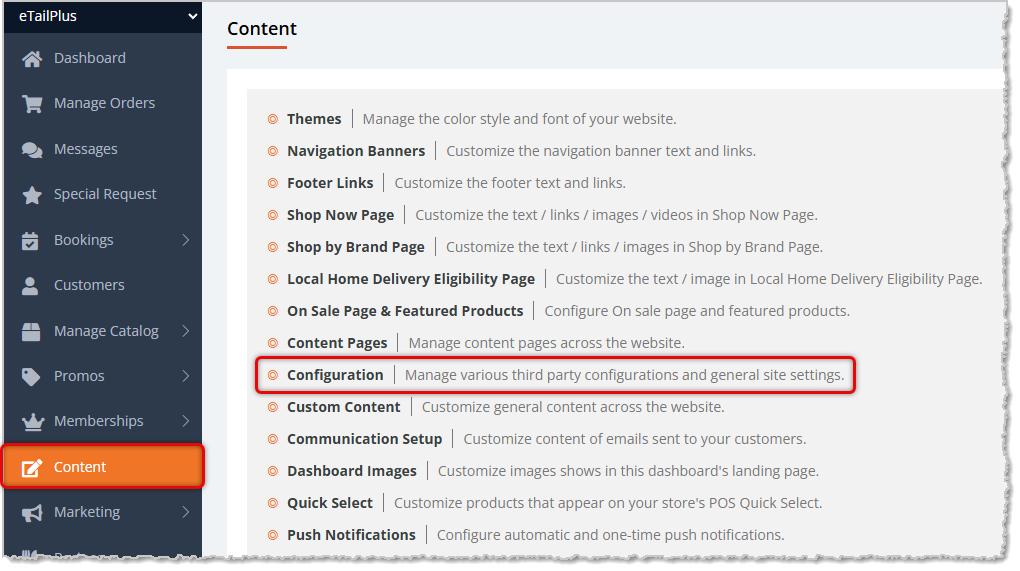
On the Configuration page, find the setting Product Reviews Enabled and check the box to enable the feature.

⚠️Please Note: If you have Stamped.io credentials in place, enabling this will override that functionality. Stamped.io will not be used if this feature is enabled.
That's it — the Product Review experience is now live across your storefront. You can toggle it off in this area at any time to revert to your previous setup.
Managing Reviews in Your Dashboard
Once the feature is enabled, you'll find a new Product Reviews area under the Marketing section of the main system menu on the left.
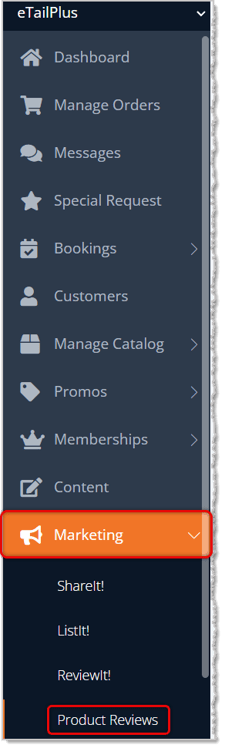
This is your home base for all reviews your customers submit.
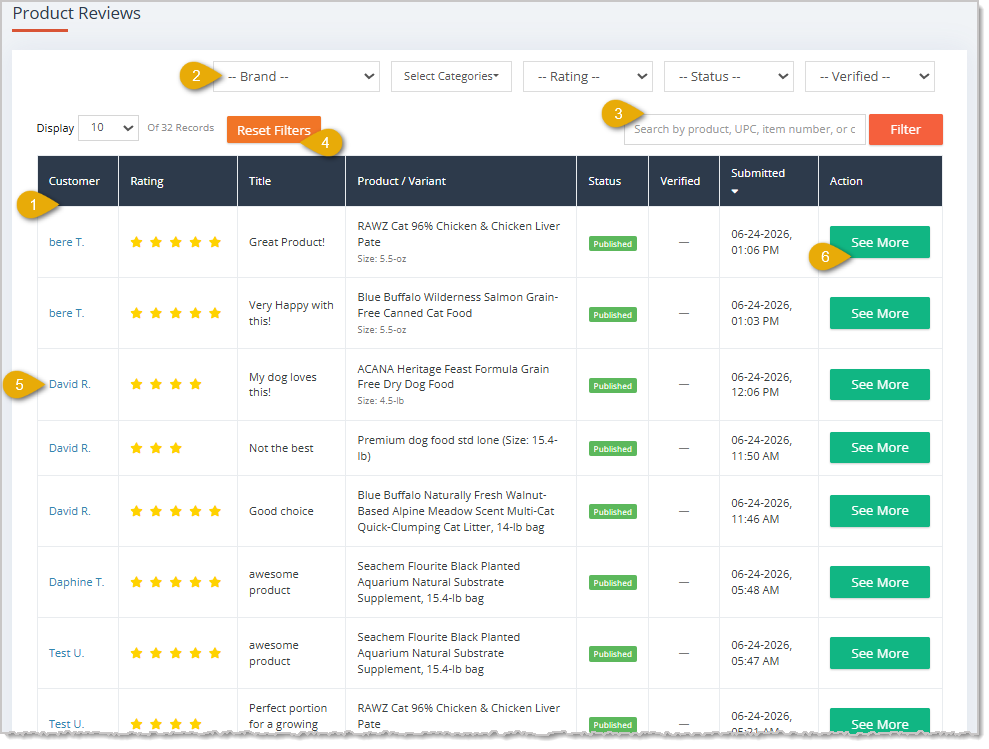
From the list you can do the following:
- See every review at a glance: View the Customer's name, star Rating, the Title of each review, the Product / Variant the customer reviewed, the Status (see section below on Review Statuses and Moderation), a Verified buyer checkmark, and the date and time the review was Submitted.
- Filter by Brand, Categories, Rating, Status, and Verified buyer status.
- Search by product title, UPC, internal item number, variant UPC/item number, or customer name.
- Reset Filters and adjust how many reviews appear per page.
- Click on the Customer name to view their full details, if needed.
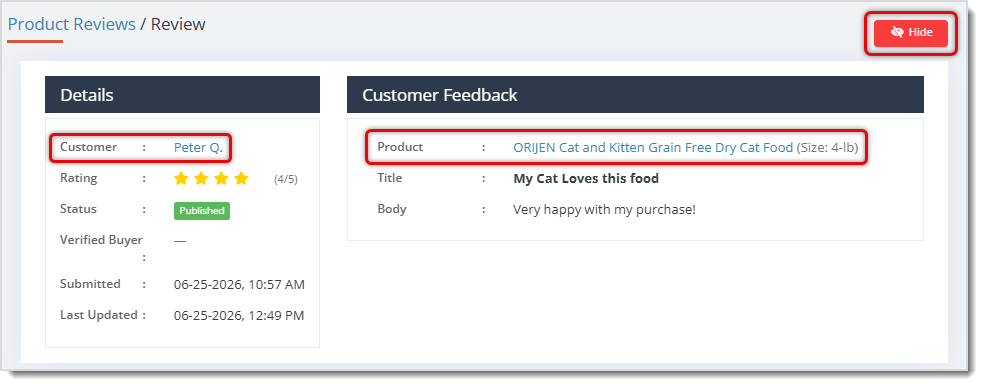
- Click the See More button on any review to open its full detail page, where you can read the complete review and take moderation actions. You can click the Product link on the Review page to view the full product details. On the review's details page, you can click the Hide button in the upper right if the review is abusive or one you would not want to include. If a review is already hidden, this button turns into Restore.
Review Statuses and Moderation
Every review has a Status, and you decide what's visible on your storefront:
|
Status |
Visible On Storefront? |
What It Means |
|
Pending |
❌ |
Awaiting moderation. Auto-publishes after 24 hours if not flagged. |
|
Flagged |
❌ |
Automatically held because it may contain inappropriate content. You can find the reason on the review's detail page. |
|
Published |
✅ |
Live and visible to shoppers. |
|
Hidden |
❌ |
Removed from the storefront by you. |
From a Review detail page you can:
- Publish a Pending or Flagged review to make it live immediately.
- Hide a Published review to remove it from your storefront.
- Unflag a Flagged review. This action returns the review to Pending status — it won't go live until you publish it or after 24 hours.
- Restore** a hidden review back to Published. what are the asterisks for?
💡Pro Tip: Unmoderated Pending reviews publish themselves automatically after 24 hours, so reviews keep flowing even when you're busy. Want one live right now? Just click the Publish button on a Pending review.
How Reviews Appear on Your Storefront
Product List and Search
Products that customers have rated show a star rating and review count right on the product, helping shoppers spot favorites as they browse.
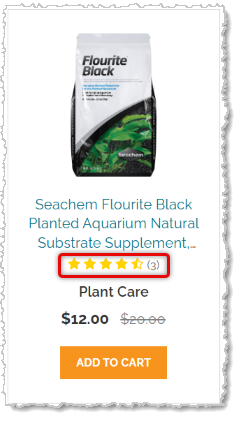
💡Pro Tip: When a new review is published, it appears on the product's detail page right away. The star rating on the product’s website page updates on the next daily catalog sync. Need it sooner? Simply open and Save the product in your dashboard to refresh its rating immediately.
Product Web Page
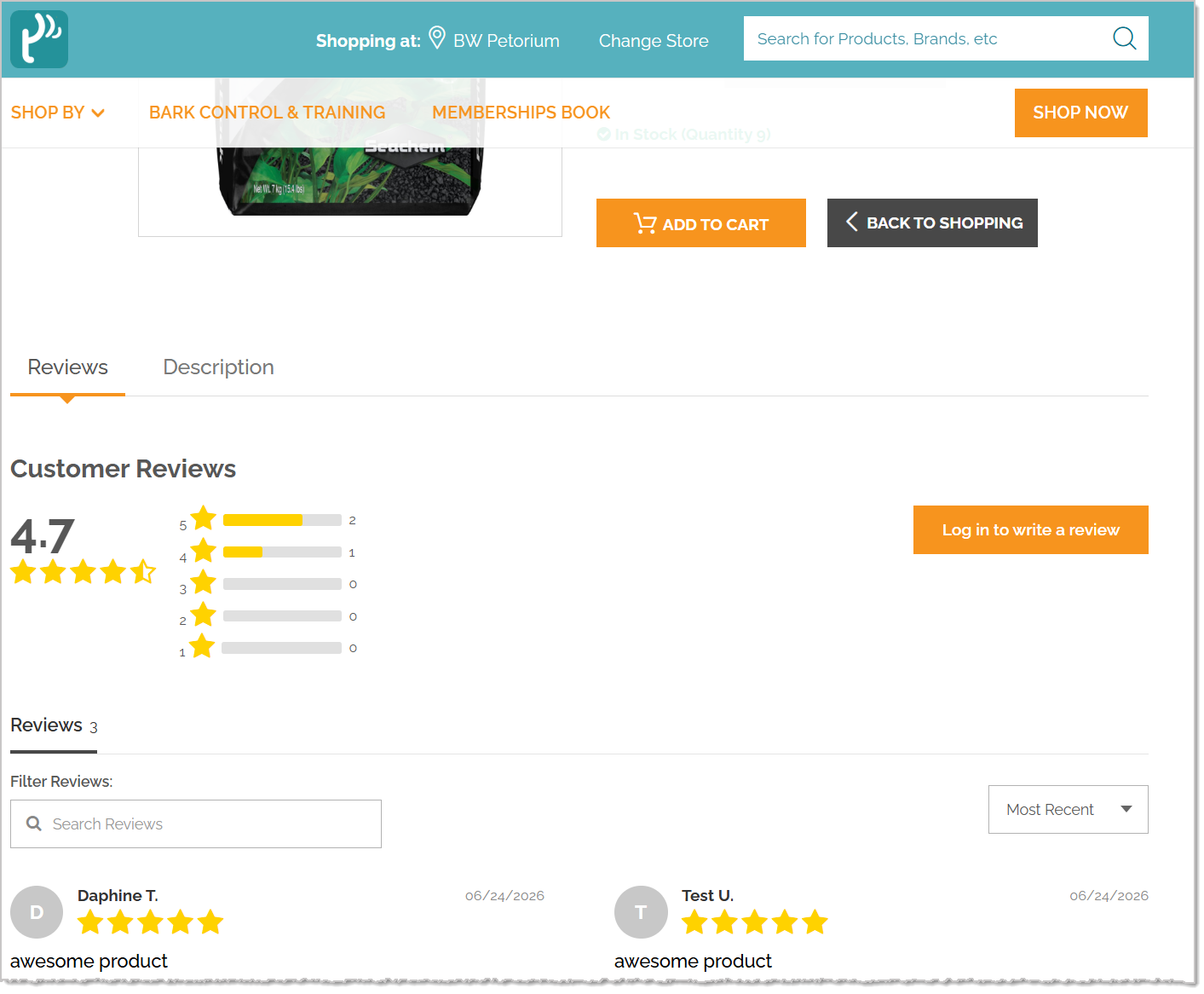
A star badge sits near the product title, showing the overall rating and total number of ratings.
The Reviews tab — shown alongside the Description tab — includes:
- The average score with stars and a rating distribution breakdown (5 stars down to 1 star).
- Search and Sort (Most Recent, Highest Rating, Lowest Rating) so shoppers can find relevant reviews fast.
- A Write a Review button for logged-in customers, or a Log In to Write a Review button for visitors who are not logged in.
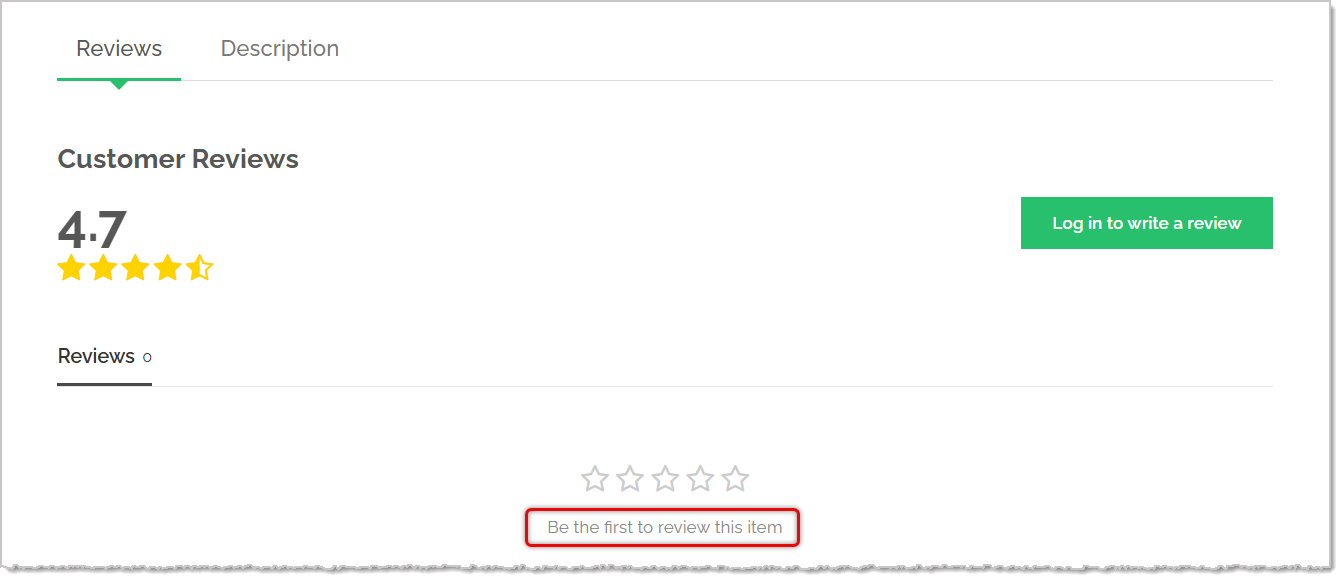
Because ratings are pooled across all eTailPet retailers, while written reviews stay specific to your store, a product can show an aggregate star rating even when your store doesn't have written reviews for it yet. In that case, shoppers see a friendly "Be the first to review this item" prompt.
How Customers Write a Review
Customers must be logged in to leave a review (guests see a "Log in to write a review" prompt). When writing, they provide:
- A Star Rating — Required.
- A Title — Between 3 and 120 characters.
- A Review — Between 10 and 4,000 characters.
After submitting, customers see a thank you message letting them know their review will appear once it's been reviewed. Reviews are pooled at the product level, so all size and color variants of a product share one combined set of reviews.
Verified Buyer Badge
Reviews from customers who completed an online order for that product are marked with a Verified Buyer badge as an extra layer of trust for your shoppers. In-store POS purchases don't qualify for the badge.
A customer’s website order must be at one of these specific stages by the time the review is written for the customer to qualify for the Verified badge:- Store Pickup: Marked as Picked Up.
- Local Delivery: Marked as Delivered.
- Ship-To-Me: Marked as Shipped.
Keeping Reviews Genuine
To keep things fair and clean, a few rules run automatically behind the scenes:
- One review per product, per customer.
- A reasonable limit on how many reviews a single customer can post in a short period.
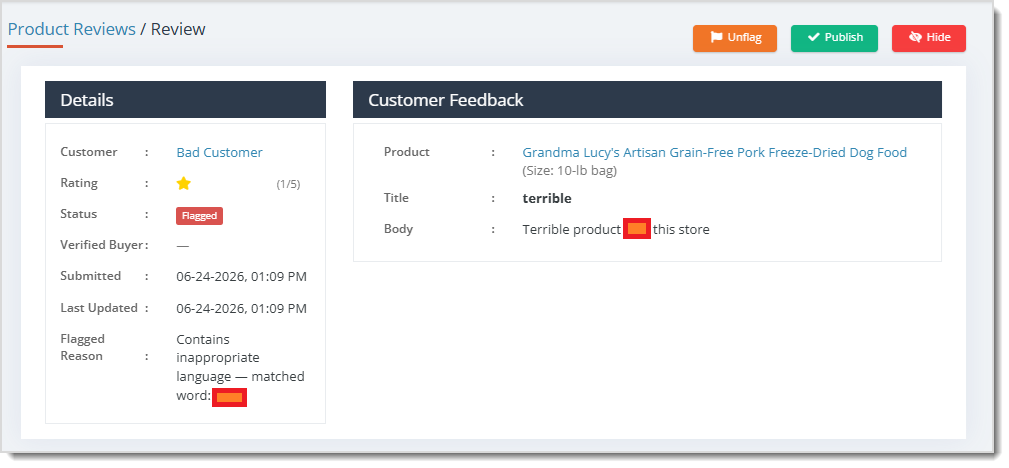
- Reviews containing inappropriate language or personal information are automatically flagged and held back from the storefront without calling it out to the customer.
- Reviews containing phone numbers or emails are automatically flagged as well, for privacy reasons.
Good to Know
- Ratings vs. Reviews: Star ratings are aggregated across all eTailPet retailers to help products earn meaningful ratings faster. Written reviews are always specific to your store.
- Variants: A product and all its variants (sizes, colors, etc.) share a single review pool on the product’s detail web page.
- Private Products: Private products you sell online can collect reviews just like Public products.
- Turning Off Product Reviews: Disable the setting any time to return your storefront to its previous behavior.
- Hiding Negative Reviews: We advise that you don’t hide reviews that are negative or have a low-star count. Unless the customer’s issue isn’t with the product itself, we recommend letting the customer ratings speak for themselves on the quality of the products. If your customers only see four or five-star reviews for everything, they’ll begin to question the trustworthiness of the reviews.
Related Topics
Frequently Asked Questions
Q. Can retailers moderate reviews before they go live?
A. Yes. All reviews default to Pending status which are published after a delay, but you can hide them before they go live.
Q. Can customers submit reviews without an account?
A. No. The storefront displays a Log in to Write a Review button, requiring customers to be signed in to submit feedback.
Q. How is a reviewer marked as a Verified Buyer?
A. The platform automatically checks whether the reviewing customer has a purchase history for the product and applies the Verified Buyer badge accordingly. The order must have been placed online and be in the correct status at the time the review was submitted.
- Store Pickup – Marked as Picked Up.
- Local Delivery – Marked as Delivered.
- Ship-To-Me – Marked as Shipped.
Q. Can I restore a Hidden review?
A. Yes. The review detail view includes a Restore button to republish a previously hidden review.
Q: I have a question, but I can't find my answer here. How do I get more assistance?
A: You can ask any question at the number listed here. Contact our support team at (323) 370-0738 for the U.S. and (888) 370-2363 for Canada.
Is this page helpful?
×Help us improve our articles