






WisePOS E / S700 Card Reader Setup
💳 eTailPet Payments The WisePOS E / S700 card reading terminal is a wireless countertop reader for
 Aug 21, 2026
At the beginning of the new year, you will receive a physical copy of your 1099-K tax form in the mail. You can also download the form from your Payments Portal after the date listed below.
January: 1099-K forms will be generated for the previous year.
January 31: 1099-K forms will be generated, and physical copies will be printed and mailed.
By January 31: e-Statements will be made available for download from the payment portal for custom account users and will be available on the Tax page in the Portal.
March 31: Final date by which adjustments can be requested before 1099-K forms will be submitted to the IRS.
To download a copy of the 1099-K form, follow the below steps:
Log into the eTailPet Payments Portal.
Click on the Account drop-list menu and then click Tax Forms.
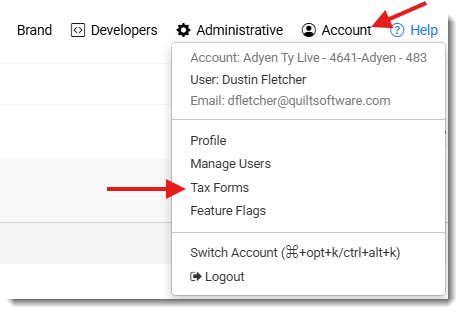
On the Tax Forms page, you will find a line with the previous year, and a print icon on the right. Click on the print icon. This will give you the option to print the 1099-K form to a printer or download this form in a PDF format.

If you find any updates or corrections that need to be made to the 1099-K form, please reach out to our support team at the number below with the details that need to be corrected.
Q: I have a question, but I can't find my answer here. How do I get more assistance?
A: You can ask any question at the number listed here. Contact our support team at (323) 370-0738 for the U.S. and (888) 370-2363 for Canada.
Is this page helpful?
×Help us improve our articles